Integration Services
 Business Consulting & Advisory
 AI Solutions
 AppExchange Development
 Tailored Salesforce Engineering
 Managed Services
 Implementation

Key Takeaways:
- Evaluate integration patterns based on latency, volume, and transformation complexity before building.
- Leverage AWS Lambda for scalable, serverless custom logic between Salesforce and AWS services.
- Implement Private Connect to ensure secure, production-ready traffic outside the public internet.
- Use Amazon EventBridge for flexible, event-driven architecture and real-time data routing.
- Select engagement models that align with your team’s internal expertise and project requirements.
The partnership between Salesforce and AWS has evolved in significant ways. Salesforce now operates on the AWS Marketplace. Amazon Bedrock connects deeply with Einstein and Agentforce. Tools like Service Cloud Voice also run on AWS infrastructure.
These changes affect which AWS and Salesforce integration patterns work best. They also impact which security controls matter, and which engagement models hold up in production.

Architects designing these integrations are making pattern-selection decisions with long-term implications. Their choices will set boundaries on what their organization can build in the future as this alliance continues to deepen.
This blog provides what architects and integration teams need. It explains integration patterns with reasons for choosing one over another. And it provides security and governance frameworks teams can apply to real projects.
Table of Contents
- AWS Integration with Salesforce
- The Integration Pattern Decision Flow: Choosing Between AppFlow, EventBridge, Lambda, and More
- AWS to Salesforce Integration Patterns
- AWS Lambda Salesforce Integration: The High-Value Pattern in Depth
- Security, Governance, and Private Connectivity
- AWS Marketplace and Salesforce Integration Engagement Models
- How Achieva Approaches Salesforce AWS Integration
- Conclusion
AWS Integration with Salesforce
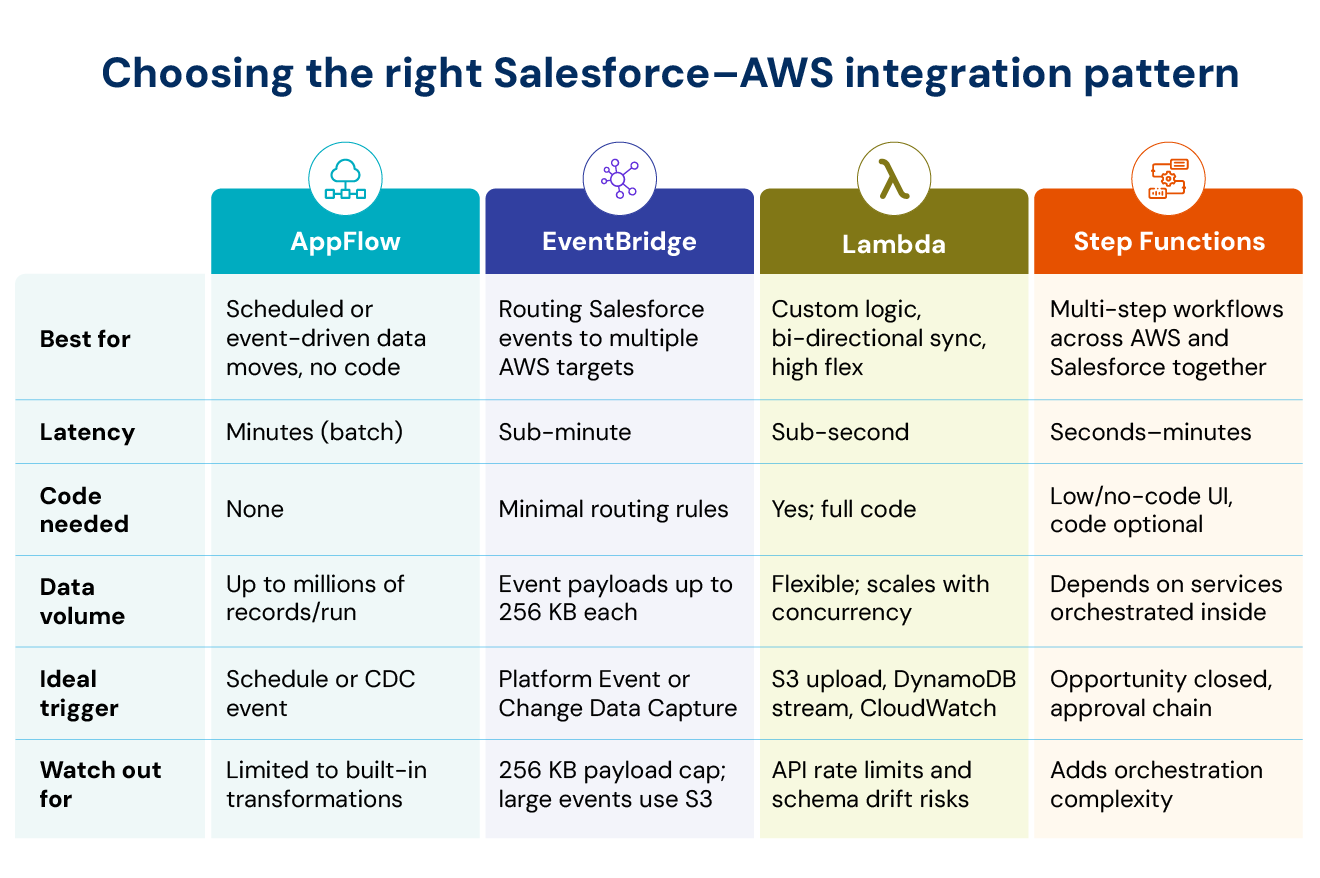
Architects cannot choose the right integration pattern without proper knowledge of what each platform can do. They need a clear picture of the services available on both sides before deciding how to connect with them.
I. AWS Integration Services for Salesforce
- Amazon AppFlow is a managed service for moving data between SaaS applications that supports Salesforce as both a source and a destination.
- Amazon EventBridge receives Salesforce events in two ways. First, Salesforce can directly send events to EventBridge using its Event Bus Relay feature. Second, AppFlow can route Salesforce events to EventBridge.
- AWS Glue offers serverless data integration with a native Salesforce connector. Glue can ingest and transform Salesforce data and send it to AWS destinations like S3. Its reverse ETL capabilities allow writing data back to Salesforce from AWS.
- AWS Lambda is a serverless compute service that appears in almost every Salesforce integration as the processing layer between services.
- AWS Step Functions coordinate multi-step workflows that involve Lambda, other AWS services, and Salesforce updates.
- Amazon S3 serves as a storage workspace for Salesforce data extracts and large event payloads.
- Amazon Bedrock integrates with Salesforce Einstein and Agentforce and allows foundation models to create content inside Salesforce.
- Amazon Connect links with Service Cloud Voice and provides contact center functionality within Salesforce CRM.
- AI & Machine Learning Services like Comprehend, Rekognition, and Textract process Salesforce data for advanced analytics.
II. Salesforce Integration Capabilities for AWS
- Salesforce REST API provides standard programmatic access to Salesforce data and serves as the foundation for most custom integrations.
- Bulk API 2.0 handles asynchronous data exports and imports for large volumes.
- Composite REST API bundles multiple dependent requests into a single call. It supports all-or-nothing transactions for parent-child entities.
- Streaming API and Change Data Capture (CDC) deliver real-time event streams when Salesforce data changes.
- Platform Events are custom event messages defined within Salesforce. They trigger external workflows and serve as the native event publisher for integrations going to AWS.
- Salesforce Private Connect establishes private connectivity to AWS through Private Link. This keeps traffic off the public internet. It is the secure path for production integrations.
- External Services allow Salesforce to call external APIs. They typically work with API Gateway endpoints.
- Named Credentials store AWS endpoint URLs and authentication tokens in Salesforce’s encrypted credential store.
- Apex callouts enable programmatic outbound integrations from Salesforce to AWS when declarative options are not enough.
- MuleSoft Anypoint, Salesforce’s enterprise integration platform, provides extensive AWS connector libraries. It handles complex orchestration scenarios.
The Integration Pattern Decision Flow: Choosing Between AppFlow, EventBridge, Lambda, and More
Architects need to evaluate six major dimensions before they select the right integration pattern. Those who skip this crucial step create design mismatches that show up months later in production.
1.Direction of Data Flow
Salesforce to AWS is the most common direction. Salesforce records feed into AWS for storage, analytics, or processing. AppFlow handles this natively with scheduled or event-triggered flows.
AWS to Salesforce happens when external systems or AWS services update Salesforce records. Lambda functions calling the Salesforce REST API handle this pattern, especially when paired with EventBridge for routing.
Maximize Salesforce Potential with These Integration Best Practices
2. Latency Requirements
Batch processing collects data over set periods and moves it during off-peak hours. AppFlow supports schedule-triggered flows at a maximum frequency of one run per minute.
Near real-time patterns deliver data within seconds. AppFlow event-based flows and EventBridge consume Salesforce Change Data Capture Events and Platform Events. This gives you sub-minute latency.
Real-time synchronous patterns need sub-second responses. Direct API calls work best here. This pattern suits user-facing workflows where delays hurt the experience.
3. Data Volume and Payload Size
AppFlow can transfer up to 15 GB of data per flow run when pulling from Salesforce. A typical Salesforce record is about 2 KB. So, 15 GB equals roughly 7.5 million records. Workloads exceeding this limit need to be split into multiple flows using appropriate filters.
When AppFlow sends events to EventBridge, messages larger than 256 KB follow the “claim-check” pattern. EventBridge removes the payload, stores the data in an S3 bucket, and forwards a URL instead of the actual content.
When pulling data from Salesforce, volumes under 1,000,000 records use the REST APIs. Larger data sets require Bulk API 2.0. When writing data into Salesforce, this threshold changes to 1,000 records.
4. Event-Driven vs Request-Response Architecture
Event-driven architectures decouple the system that sends events from the system that receives them. This creates flexible connections. Salesforce Platform Events publish to EventBridge partner event buses. From there, EventBridge routes them to Lambda, Step Functions, or other targets. This pattern works well for near real-time notifications and high-volume complex messages.
Request-response patterns suit scenarios that need an immediate synchronous answer. User-facing flows in Experience Cloud are a good example.
5. Code vs No-Code Integration
AppFlow is a no-code integration service that offers a configuration interface to move data between Salesforce and AWS. It does not require any custom code and works well for companies with limited technical expertise.
Lambda-based patterns require code but offer greater flexibility for complex business logic. Lambda functions become necessary when you need specialized data manipulation or parsing.
6. Transformation Complexity and Orchestration Needs
AppFlow has many built-in transformations. These handle field mapping, masking sensitive data, and formula-based changes. For simple data movement, this is usually enough.
Complex transformations need more than AppFlow can provide. Step Functions coordinates multi-step workflows. It can sequence AWS services, external APIs, and other processing steps. When you need to coordinate across multiple systems, orchestration becomes the central challenge, not just mapping fields.
AWS to Salesforce Integration Patterns
Teams face distinct challenges when writing data from AWS to Salesforce. Salesforce API limits, token management, and record-level validation rules determine whether your integration works in production or fails during the first load test.
I. AppFlow Scheduled Inbound Flow
AppFlow pulls data from AWS sources on a schedule and writes it to Salesforce objects. Teams configure schedule expressions to control how often the flow runs.
The dataPullMode setting determines whether each run transfers only new or changed records (incremental) or the full dataset (snapshot). For incremental transfers, you must specify a timestamp field, so AppFlow knows which records are new or updated.
When writing to Salesforce, AppFlow automatically selects the right API based on record count. It uses the REST API for fewer than 1,000 records and switches to Bulk API 2.0 for 1,000 or more records.
II. Lambda-Triggered Salesforce API Write
Lambda functions process AWS events and write data to Salesforce using the REST API or Bulk API 2.0. The connection stays secure by using any of the three OAuth flows: client credentials, JWT bearer, or web server flow with refresh tokens.
Salesforce Voice implementations show this pattern in action. Lambda functions call the Salesforce REST API to create, update, or delete records on objects like cases, accounts, and custom objects.
API Gateway + Lambda Backend Called by Salesforce External Services
Salesforce External Services can upload OpenAPI specifications exported from API Gateway. This generates invocable actions that can be used in Flow Builder.
For private APIs that are only accessible from VPCs, teams can use Salesforce Private Connect with AWS PrivateLink. This routes traffic from Salesforce-managed VPCs through API Gateway VPC endpoints.
Named Credentials store AWS endpoint URLs and authorization credentials in Salesforce’s encrypted credential store. This removes the need to hardcode URLs in flows.
Before each invocation, AWS Security Token Service (STS) exchanges credentials stored in External Credentials for short-term credentials. These grant access to the API Gateway.
Here’s How You Can Overcome Challenges in Salesforce Tableau Integration
IV. Step Functions Arranged Updates
Step Functions coordinates multi-step workflows that involve AWS services and Salesforce updates. The service can work with AppFlow to automate provisioning and configuration of AWS resources. This removes manual steps that teams previously had to perform.
For instance, when a Salesforce Opportunity closes, the state machine can spin up an isolated AWS storage bucket for the new customer and then update the Salesforce Account record with the new bucket path. Teams can build these workflows using a drag-and-drop interface in the AWS Management Console.
V. Bedrock-Generated AI Outputs to Salesforce
Amazon Bedrock foundation models generate content within Salesforce through Einstein Studio registration.
Requests from Salesforce pass through the Einstein Trust Layer. This layer provides dynamic grounding, enforces zero data retention, and scans for data toxicity in real time.
In Salesforce, Agentforce autonomous agents call these Bedrock models using custom actions. These actions are built using External Services, Apex Invocable Methods, or Flow. On the AWS side, the integration requires giving users bedrock:InvokeModel permissions.
VI. AWS Marketplace Salesforce Connector
The AWS Partner CRM Connector lets field sales representatives create and publish AWS Marketplace private offers within Salesforce. The connector is modular and provides governance, visibility, and management of private offers, resale authorizations, and ACE leads and opportunities.
Users can install this managed package from the Salesforce AppExchange at no extra cost.
AWS Lambda Salesforce Integration: The High-Value Pattern in Depth
Lambda functions connect AWS services to Salesforce. This pattern appears in nearly every modern integration because Lambda sits between Salesforce events and AWS destinations, or between AWS triggers and Salesforce record updates.
1. Why Lambda Is the Foundational Integration Pattern
Lambda runs custom business logic without requiring you to manage servers. It scales automatically from a single request to thousands of concurrent invocations.
For example, in Salesforce Service Cloud Voice implementations, Lambda functions scale up to manage spikes in call volume. They sit between the telephony network and the CRM, and invoke the Salesforce REST API to update cases, accounts, and custom interaction records. This serverless setup helps businesses with unpredictable daily workloads.
2. Salesforce Triggers Lambda: Event-Driven Integration
Salesforce Outbound Messages trigger Lambda functions through API Gateway endpoints. The messages are forwarded to SQS queues for asynchronous processing. This pattern decouples Salesforce from downstream processing. It handles traffic spikes without causing system delays.
Lambda functions poll the SQS queue and process messages in batches. If processing fails, the message goes to a Dead Letter Queue (DLQ) to prevent data loss. Outbound Messages do not consume Salesforce API call limits and include built-in retry mechanisms.
3. Lambda Triggers Salesforce: AWS Event Processing
Lambda functions process AWS events and write data to Salesforce using the REST API or Bulk API 2.0. The InvokeSalesforceRestApiFunction is a common utility pattern. It accepts a methodName parameter like createRecord, updateRecord, or queryRecord along with the data to process.
Common triggers include:
- Files uploaded to S3
- Changes in DynamoDB streams
- Scheduled CloudWatch events
4. Lambda Authentication to Salesforce: OAuth and JWT Patterns
- CONSUMER_KEY_PARAM_NAME
- PRIVATE_KEY_PARAM_NAME
- SUBJECT
Multi-line private keys require formatting into single-line strings with line breaks before storing them in Secrets Manager. This prevents certificate reformatting errors.
The JWT bearer flow supports server-to-server integration without a user context. Lambda signs a JWT and exchanges it for an access token.
5. Lambda Patterns for High-Volume Salesforce Operations
Custom Lambda functions must respect Salesforce API request limits. Teams must build failure blocks into their architecture if their business experiences heavy call volumes.
For high-volume processing, they can use:
- Exponential backoff for handling API rate limits
- Step Functions for queueing when concurrent writes risk record locking
- Dead-letter queues for failed writes
Security, Governance, and Private Connectivity
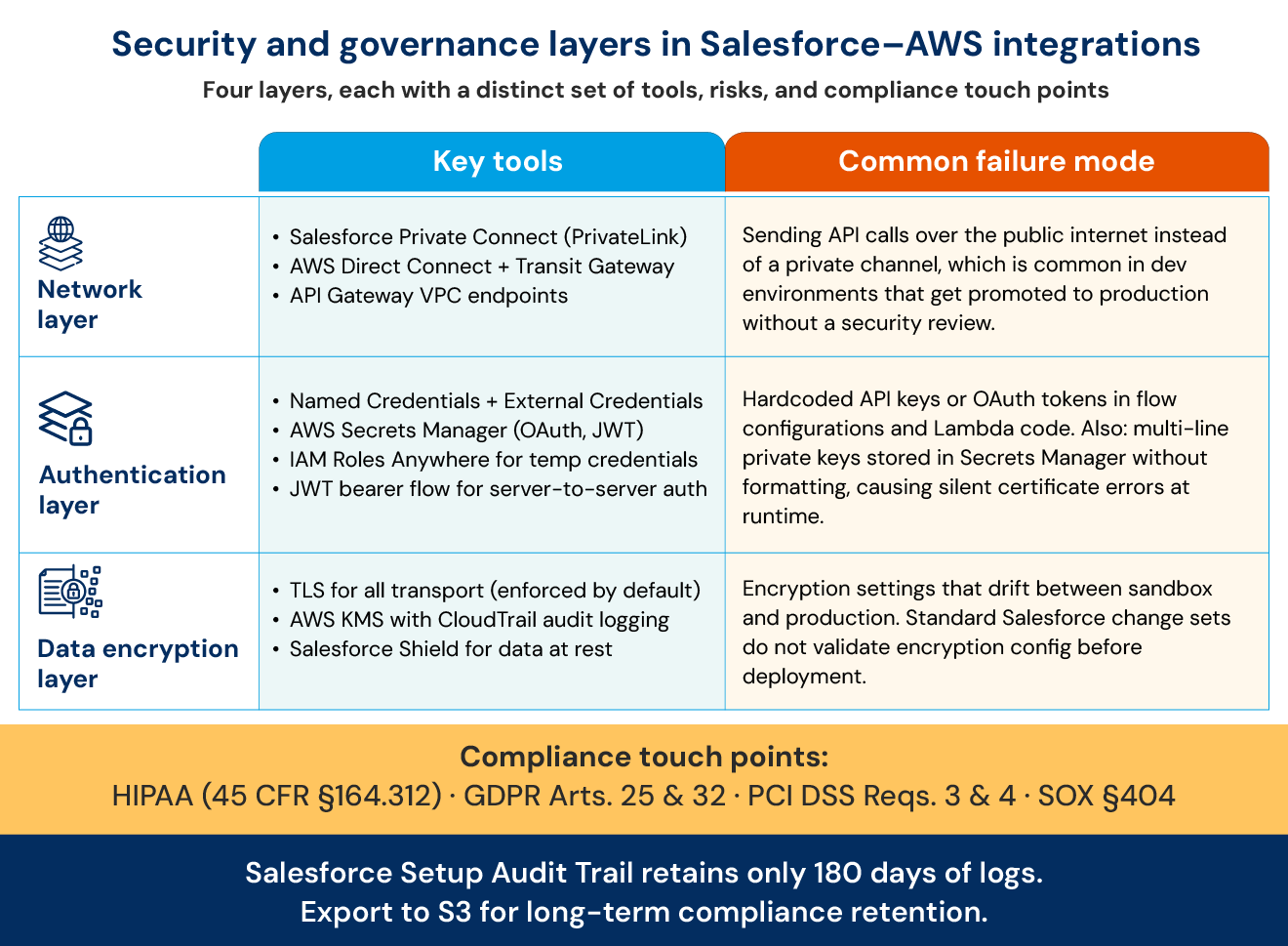
Companies in regulated industries need to meet a variety of security and governance requirements that determine whether their AWS and Salesforce integrations pass compliance review or fail before going live.
I. Private Connectivity
Salesforce Private Connect uses AWS PrivateLink to create a managed network connection between Salesforce organizations and AWS VPCs. Because of this, traffic routes through private AWS networks instead of the public internet. This architecture is essential for regulated industries.
Users who need to connect Salesforce to on-premises systems can combine AWS Direct Connect with Transit Gateway. This extends private connectivity to internal networks.
II. Authentication and Credential Management
Hardcoding passwords, AWS secret keys, or API tokens in integration flows creates severe security vulnerabilities.
- Named Credentials in Salesforce store AWS endpoint URLs and authentication tokens in encrypted storage. This removes the need to hardcode credentials in flows.
- External Credentials define authentication protocols like OAuth 2.0, Basic Authentication, AWS Signature v4, and JWT. You can reuse a single External Credential across multiple Named Credentials that share the same authentication method.
- AWS Secrets Manager stores Salesforce OAuth credentials with automatic rotation. It requires the following fields: consumerKey, consumerSecret, baseUri, appId, and consumerId.
- IAM Roles Anywhere provides STS-based authentication. It generates temporary credentials on demand instead of storing static AWS access keys in external systems.
III. Data Encryption
Salesforce encrypts all sessions using TLS. Platform APIs default to HTTPS for all transport.
Cross-platform connections between Salesforce and AWS require SSL certificates and mutual authentication. Both sides must confirm each other’s identity.
AWS KMS controls encryption key lifecycle and permissions. It uses FIPS 140-2 validated hardware security modules with physical tamper response. Customer keys stay in the AWS region where they were created and cannot be used outside HSM boundaries. CloudTrail logs every KMS request for audit purposes.
IV. Governance and Compliance Frameworks
Regulated industries impose mandates that architects need to follow.
Common triggers include:
- HIPAA: Encryption is addressable under 45 CFR § 164.312.
- GDPR: Article 32 requires encryption that is proportionate to the risk.
- PCI DSS: Requirements 3 and 4 enforce encryption rules for stored Primary Account Numbers (PAN) and cardholder data transmitted over public networks.
- SOX: Section 404 requires documented internal controls over financial system changes.
- Audit Trail Limitation: Salesforce Setup Audit Trail retains configuration history for only 180 days. This falls short of many regulatory retention mandates. Teams may need to export logs to an external repository for long-term retention.
AWS Marketplace and Salesforce Integration Engagement Models
Salesforce’s presence on AWS Marketplace changes how joint customers buy and manage these platforms. Organizations that previously managed vendor relationships separately now have a unified option.
1. Salesforce on AWS Marketplace
Salesforce products, including Data Cloud, Service Cloud, Sales Cloud, Industry Clouds, Tableau, MuleSoft, Platform, and Heroku, became available on AWS Marketplace starting in the U.S., with regional expansion following.
Organizations purchasing Salesforce through AWS Marketplace get many benefits:
- Salesforce purchases count toward AWS Enterprise Discount Program commitments
- Salesforce and AWS costs remain visible in AWS Cost Explorer
- Faster and more streamlined procurement cycles
2. AWS Marketplace Integration Solutions
AWS Marketplace lists several integration solutions, in addition to Salesforce.
- AWS Partner CRM Connector: A managed integration for AWS Partner Network workflows.
- Pre-built data connectors: Ready-made connectors from various integration vendors that simplify data movement between Salesforce and AWS.
- Industry-specific solutions: Integrations tailored for sectors like financial services, healthcare, and manufacturing.
- Managed services:Fully managed integration services from system integrators.
3. The Engagement Model Decision
Organizations have four options for building and managing their Salesforce AWS integration:
- Do-It-Yourself: Internal teams design, build, and operate the integration using AWS and Salesforce native tools. Best for organizations with strong in-house expertise.
- Marketplace Solutions: Companies purchase pre-built integration solutions from AWS Marketplace or Salesforce AppExchange. Best for standard use cases where speed matters more than customization.
- System Integrator Partnerships: Businesses work with system integrators to design, build, and support their integration. Best for complex projects or when internal expertise is limited.
- Hybrid: Companies work with system integrators for initial implementation, after which their internal teams handle maintenance and enhancements. Suited for enterprises with existing AWS teams but limited Salesforce integration depth.
How Achieva Approaches Salesforce AWS Integration
Most system integrators have a blind spot. Salesforce specialists often lack deep AWS knowledge, and AWS specialists often lack deep Salesforce knowledge. This creates integrations that cause issues when real production conditions hit.
Achieva takes a different approach. We treat Salesforce AWS integrations as part of our broader set of Salesforce Integration Services.
- Assessment: We thoroughly study your business goals and tailor the integration to your specific needs.
- Tool Selection: We recommend the right tools based on your requirements.
- Secure Setup: We establish secure connections between Salesforce and AWS to keep your information off the public internet, which is the baseline for regulated industries.
- Configuration: Our team sets up data flows and APIs to enable real-time communication between Salesforce and AWS.
- Data Migration: We safely move data from Salesforce to AWS while reducing downtime and keeping your critical data synchronized.
- Launch and Monitor: We deploy the integration in your live environment and monitor its performance to ensure smooth operation.
- Support: We provide regular post-integration support and make improvements as your needs change.
Achieva deploys a single team of dually certified Salesforce and AWS integration experts. We take accountability for the entire integration lifecycle, from the initial business assessment through long-term production support.
Conclusion
The AWS-Salesforce alliance will keep developing. Integration patterns will expand. Security and governance requirements will become stricter.
Teams that select an integration pattern without thinking through various decision dimensions will likely need to rebuild within a few months. By contrast, those who design for flexibility and governance maturity will create integrations that scale as the AWS-Salesforce partnership grows stronger.