Integration Services
 Business Consulting & Advisory
 AI Solutions
 AppExchange Development
 Tailored Salesforce Engineering
 Managed Services
 Implementation

Can a Marketo and Salesforce integration pass every technical test checkpoint yet underperform on revenue intelligence? It happens constantly. Most integration implementations are set up correctly. The native connector works, sync executes without errors, fields populate and leads to transfer.
By Adobe’s documented checkpoints, the integration is healthy. Yet RevOps teams encounter identical complaints from lifecycle stages drift from alignment to lead routing produces silent failures, and attribution can’t survive finance scrutiny.
The Marketo Salesforce.com (SFDC) integration works technically, but the lead-to-revenue operations built on top of it don’t. Dominant integration guides optimize setup correctness when the failure mode is operating model decay. Setup finishes in three weeks, while decay starts in month four and is fully visible by month eighteen. This Marketo Salesforce integration guide covers everything from prerequisites to troubleshooting, but inside a framework addressing post-go-live reality, so readers know how to set up and maintain reliable lead-to-revenue intelligence as businesses scale.

Table of Content
- How Does Marketo Salesforce Integration Drive Lead-to-Revenue Architecture?
- What Strategic Prerequisites and Pre-Integration Architecture Decisions Lay the Groundwork for a Successful Integration?
- How to Configure Marketo SFDC Integration Setup?
- What Are the Most Common Integration Failure Patterns and How to Govern Them?
- What Attribution Components Determine the Success of Lead-to-Revenue Reporting Architecture?
- How Does Achieva Approach Salesforce Marketo Integration?
- Why Is a Working Salesforce Marketo Integration Just the Baseline, Not the Breakthrough?
How Does Marketo Salesforce Integration Drive Lead-to-Revenue Architecture?
Most teams integrate Marketo and Salesforce the same way, like configuring the sync, mapping the fields, confirming data flow, and calling it done. This is the right way to set up a data pipe, but it’s the wrong way to build a revenue intelligence layer.
When teams integrate Marketo and Salesforce as technical exercises, only lead capture and qualification are designed with intent. Lead routing logic, lifecycle progression, and revenue attribution structure are configured incrementally. These layers decay first, and the result is not a broken sync; it is a fragmented revenue model that neither marketing nor sales fully trust.
A complete Salesforce Marketo integration is not a checklist; it’s a lead-to-revenue architecture with five layers, namely data model, sync mechanics, lifecycle governance, attribution architecture, and operating model. Most implementations cover only the first two and call it complete; however, the remaining three layers determine where revenue intelligence is either created or quietly lost.
The AI dimension further raises the stakes significantly. Marketo’s predictive capabilities, and Salesforce Einstein, and Agentforce depend on the integration’s data quality. A well-configured sync feeding incomplete lifecycle data produces AI recommendations confidently built on structural gaps. This clearly indicates that AI does not fix integration debt; it amplifies it at scale and at speed.
“By integrating Marketo with Salesforce, businesses can create a unified platform where marketing and sales teams collaborate effortlessly, leading to faster lead conversions and increased revenue.”
– Volodymyr Babin, Head of Salesforce Delivery at MagicFuse.
What Strategic Prerequisites and Pre-Integration Architecture Decisions Lay the Groundwork for a Successful Integration?
Most integration guides treat prerequisites as a checklist. However, they are the first set of architectural decisions in the integration lifecycle and the hardest decisions to reverse without rebuilding the core configuration. Teams that rush through the integration as a series of checklist items to clear quickly discover six months later that the constraints they established in week one is now limiting what the integration can deliver.
1. Salesforce Edition and API Access
The Salesforce edition determines whether the integration can exist in its intended form. Native Marketo sync requires Enterprise, Unlimited, or Developer Salesforce editions. Professional edition introduces API constraints that require add-ons and limit scalability under automation and real-time sync conditions. This is not a licensing detail. It is an architectural constraint.
Teams that proceed with the wrong edition design an integration with a built-in ceiling, one that surfaces only when volume, routing complexity, or AI-driven workflows increase.
2. The Salesforce Sync User
Standard guidance on sync user configuration is consistent across documentation. However, most integration guides skip the architectural dimension that defines the permission boundary of what Marketo can read, create, and update in Salesforce. It controls the integration’s authority over lifecycle, ownership, and data integrity.
Adobe’s 2025 Marketo Mochas webinar notes that with around 90% of Marketo customers also use Salesforce, making the sync user one of the most critical integration points in the marketing technology stack. Most teams under-govern this layer. Over-permissioned leads to data integrity issues, while under-permissioned users cause silent sync failures. Mature Salesforce-Marketo implementations treat the sync user as a governed access layer, aligned to business rules, not just a technical login for the system.
3. Marketo CRM Sync Entitlement
Not all Marketo subscriptions include CRM sync. This is often discovered late, when configuration begins, and the feature is missing. At that point, timelines slip or scope change mid-projects.
This is a classic structural gap. Treating Marketo CRM sync entitlement as part of the architecture forces early validation. It aligns procurement with system design and ensures the integration exists as a usable layer before any dependencies are built on top of it.
4. Object Model Decisions Before Setup
The most critical decisions are usually skipped. Before any sync begins, teams must define how leads and contacts interact, whether accounts are part of the sync model, and how custom objects will be handled.
These choices define system behavior, not configuration details. Reversing them later is disruptive and costly. Most flawed Marketo SFDC integration projects trace back to unclear object model design decisions made too late or never made at all.
5. Field Inventory and Naming Convention
Field mapping is often approached as a technical exercise. In practice, it reveals a governance problem. Enterprises typically discover hundreds of fields across Marketo and Salesforce with duplication, inconsistent naming, and unclear ownership.
Without cleanup, mapping becomes guesswork. Field hygiene must precede integration. A clear naming convention, ownership rules, and a rationalized field set create a stable foundation for reporting, lifecycle alignment, and long-term maintainability in any Marketo to Salesforce integration.
The Strategic Realty
Teams that treat these prerequisites as checklist items move quickly at setup and pay later. However, teams that treat them as architecture decisions move slower initially but recover that time over three times in the first year of operation. The difference shows up not at go‑live, but in the stability of the system after 12 months.
Make the right architecture decisions before a single field is mapped. Achieva’s certified architects review your prerequisites - before you build.
How to Configure Marketo SFDC Integration Setup?
Most content labeled as a Marketo–Salesforce integration guide focuses on step-by-step setup instructions. What’s missing is how those steps translate into long-term system behavior. This section covers the full setup but is organized into four architectural layers.
Layer 1: Connecting the Systems
To integrate Marketo and Salesforce, the connection sequence is straightforward. Install the native package or configure Launch Point, authenticate using the dedicated sync user, grant required permissions in Salesforce, and verify connection status within Marketo Admin. This is stable and well-documented.
This layer rarely breaks. It is deterministic and repeatable. The mistake is believing that a successful connection equals successful integration. In reality, this step only establishes the pipe; the behavior of what flows through it is determined by the layers that follow.
Layer 2: Field Mapping Architecture
Field mapping is where architecture begins. Standard field mapping covers leads, contacts, accounts, and opportunities that require clear directionality decisions. Some fields should sync bidirectionally, while others must be controlled by a single system to avoid conflicts.
Custom field mapping introduces the decisions that determine the integration’s longevity. Naming conventions established at setup to determine whether the field’s inventory remains navigable after 18 months. Field type compatibility issues like data type mismatches, picklist value misalignment, time zone drift, and truncated text fields quietly corrupt data that surfaces in reports months after setup. Lifecycle fields are especially sensitive; therefore, ownership must be defined upfront. Mature teams also define field retirement policies to prevent long-term sprawls.
Layer 3: Sync Behavior Configuration
Sync configuration defines how data moves in practice. Default bidirectional sync applies to leads and contacts, but most other objects require deliberate directionality. Sync filters control which records move, protecting API limits, and preventing unnecessary data flow.
Initial sync is resource-intensive and can take hours or days, depending on scale. Ongoing sync runs in near-real time but operates in cycles, not continuously. Teams that plan API usage and volume upfront avoid performance degradation as their Marketo to Salesforce integration grows.
Layer 4: Validation and Cutover
Validation determines whether the integration behaves as designed. Create test records in both systems, verify bidirectional propagation, and document edge cases. Walk leads through lifecycle stages to confirm that status changes flow correctly between systems.
Campaign association and attribution data must also be validated. Before go-live, confirm sync filters, user permissions, and monitoring alerts. A complete Marketo and Salesforce integration guide2 should treat validation as proof of behavior, not as a final checklist step.
The Strategic Realty
The setup is comprehensive and takes weeks to do well. Even when executed correctly, it does not survive the first year without governance. The integration of a real lifecycle begins after a cutover. The next three layers, namely lifecycle governance, attribution architecture, and operating model, determine whether the system endures or degrades.
What Are the Most Common Integration Failure Patterns and How to Govern Them?
Integration failures stem from lifecycle stage drift, field sprawl, sync filter erosion, lead-to-contact conversion failures, and opportunistic & custom object sync drift. Without a governance layer, the integration drifts silently. The result is not system failure but a gradual loss of trust in reporting and lifecycle accuracy.
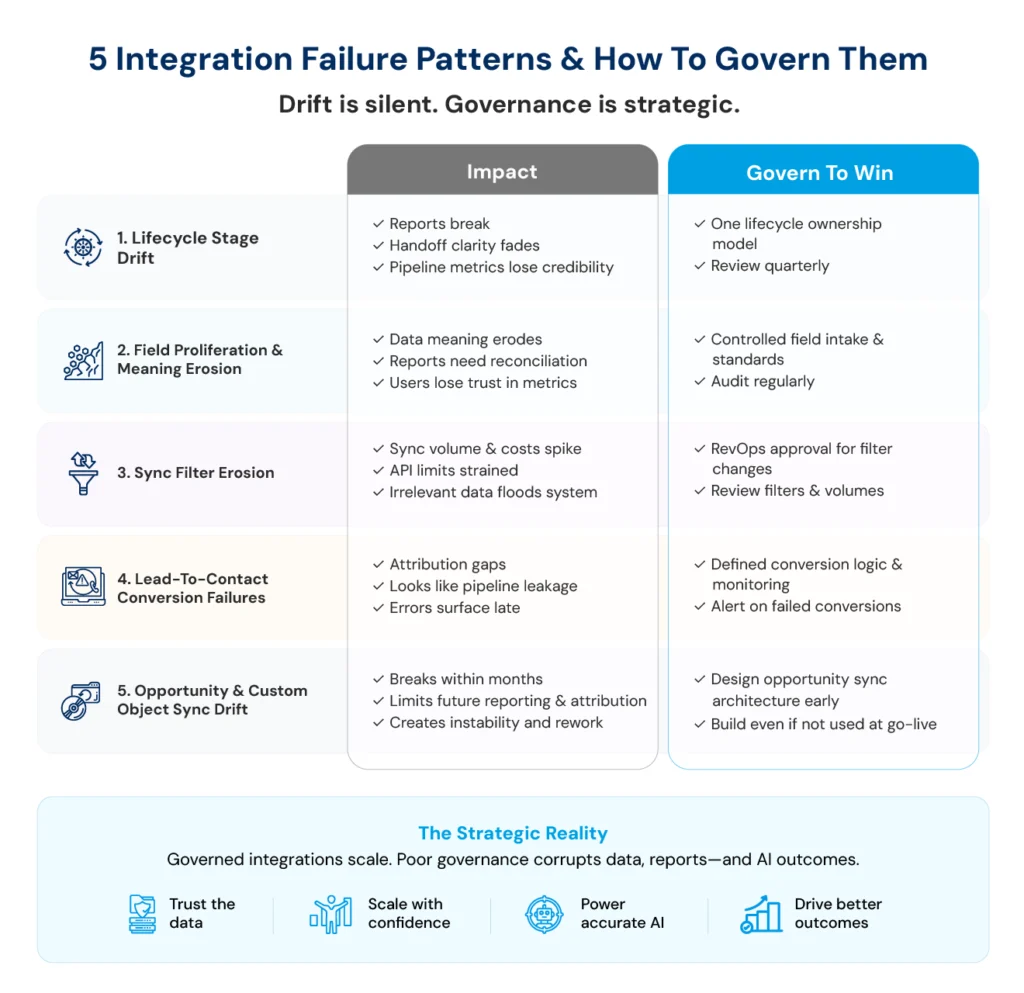
Pattern 1: Lifecycle Stage Drift
At launch, lifecycle stages align between Marketo and Salesforce. Over time, Marketing renames stages and Sales introduces new opportunity phases, and neither fully updates sync logic. Two systems start describing the same record in different ways. Recent industry data shows that 58%3 of B2B organizations cite process misalignment as their primary growth barrier.
The impact is subtle but severe. Reporting breaks, handoff clarity fades, and pipeline metrics lose credibility. Preventing a drift requires a single lifecycle ownership model, documented and reviewed quarterly. Without it, alignment decays with every incremental change.
Pattern 2: Field Proliferation and Meaning Erosion
At setup, every synced field has a documented purpose, owner, and picklist standard. Over time, new fields are added without ownership or naming standards. Duplicate fields emerge, like “Industry,” “Industry Type,” “Primary Industry”, each with inconsistent values and unclear usage.
This erodes data meaning. Reporting teams reconcile conflicting fields, and business users lose confidence in metrics. Governance requires a defined intake process for new fields and scheduled audits. Without this, the system accumulates noise faster than it creates value.
Pattern 3: Sync Filter Erosion
Sync filters protect system performance at go-live. Over time, individual requests loosen filters incrementally until filters lose their original purpose. By month 12, the filter is essentially syncing everything, and sync volume has tripled. Sync volume increases, API limits are strained, and irrelevant data floods the system.
This is not a technical issue; it is a control issue. Sync filters must require RevOps-level approval, not ad hoc adjustments. Without governance, filters expand to accommodate requests until they become effectively meaningless.
Pattern 4: Lead‑to‑Contact Conversion Logic Failures
Lead-to-contact conversion is the most common silent failure point. When leads convert to contacts, Marketo activity history should follow the record consistently. However, in practice, this works correctly for some records and silently fails for others. Reports built on this data show attribution gaps that look like pipeline leakage but are actually data infrastructure failures.
These issues surface late, often in revenue analysis. Preventing them requires defined conversion logic, monitored exceptions, and automated alerts flagging records where the activity history did not follow conversion correctly. Without oversight, the system behaves inconsistently, and the errors compound unnoticed.
Pattern 5: Opportunity and Custom Object Sync Drift
Many teams delay syncing opportunities into Marketo. Later, they attempt to enable it for attribution. Without a designed architecture, this becomes a reactive configuration, one that often breaks within months due to schema or logic conflicts.
The fix is early design. Even if unused at go-live, the opportunity sync architecture must exist. A Salesforce Marketo integration4 without this foresight limits future reporting and introduces instability when revenue attribution becomes a priority.
The Strategic Realty
Lifecycle governance is the difference between an integration that scales and one that requires periodic rescue projects. These decay patterns are predictable and preventable. As AI layers like Agentforce and Einstein depend on this data, poor governance does not just break reporting; it corrupts AI outputs downstream, producing confident recommendations based on structurally flawed inputs.
Recognizing any of these 5 failure patterns in your current integration? Achieva’s governance framework stops the decay before it reaches your revenue reporting.
What Attribution Components Determine the Success of Lead-to-Revenue Reporting Architecture?
Attribution is often treated as a reporting layer built after the integration works. In practice, attribution success is determined earlier by whether opportunity linkage, campaign structure, and lifecycle rules were architected correctly. Explore the three components that determine whether attribution produces reporting finance trusts.
| Component | Core Requirement | Architectural Truth |
|---|---|---|
|
Marketing-Sourced vs Influenced Revenue |
Accurate lead origin & consistent engagement capture |
If the integration doesn’t support both views, revenue impact will always be debated, not trusted. |
|
Campaign-to-Opportunity Association |
Program-to-campaign mapping & member-to-opportunity linking |
Without a provable path from interaction to impact, activity remains without consequence. |
|
Attribution Models & Lookback Windows |
Complete journey data with precise timestamps |
The integration architecture sets the ceiling, attribution models only operate within it. |
The Strategic Realty
Attribution is where lead‑to‑revenue operations either align or visibly break. When marketing, sales, and finance produce different revenue numbers, the issue is never analytical; it is architectural. When all three produce the same revenue figures from the same integration, the lead-to-revenue architecture works as intended.
Is your attribution producing numbers marketing, sales, and finance all agree on? If not, the problem is architectural and fixable.
How Does Achieva Approach Salesforce Marketo Integration?
Most consultancies treat Marketo and Salesforce integration as a technical setup ending at launch. Achieva sells lead-to-revenue architecture designed for continuous governance. The practice approaches Marketo Salesforce integration covering five layers at setup (data model, sync mechanics, lifecycle governance, attribution, operating model), then continuing engagement through post-go-live evolution when most integrations decay.
Operating as Achieva.ai with Salesforce Summit Partner credentials and certified integration architects across Marketo, Pardot, Marketing Cloud, the practice prioritizes architecture before configuration, capability over dependency, operating model enablement above technical setup. In markets saturated with consultancies configuring native sync, what distinguishes Achieva is managed advisory continuing beyond go-live through lifecycle governance and attribution layers determining whether integration delivers reliable revenue intelligence at month eighteen versus disappearing after technical setup succeeds at month three.
Why Is a Working Salesforce Marketo Integration Just the Baseline, Not the Breakthrough?
Most integration guides answer the wrong question – How do I connect Marketo and Salesforce? It has dozens of answers, all technically correct, and most operationally incomplete. The right question is ‘what lead-to-revenue architecture do I need’, and ‘what must the Marketo Salesforce integration look like to support it’? This has one answer that depends entirely on how seriously the organization treats lifecycle governance, attribution architecture, and operating model design.
The AI-native context eliminates the margin for architectural compromise. Agentforce, Einstein, and Marketo’s predictive capabilities don’t compensate for integration of debt; they surface it faster and at a higher business cost. Teams that built the integration as architecture are positioned to extract compounding value from AI investments. Teams that treat it as a setup will be replatforming while their competitors are compounding. A working integration on day one is the floor, while an integration delivering reliable lead-to-revenue intelligence on day 600 is the ceiling. The gap between the two is not configuration, but architecture, governance, and operating model.