 Integration Services
 Business Consulting & Advisory
 AI Solutions
 AppExchange Development
 Tailored Salesforce Engineering
 Managed Services
 Implementation

For years, Salesforce releases have incrementally improved admin tooling, introduced AI capabilities, and modernized UI components. Spring ’26 is different. This release addresses scale, trust, automation, AI governance, ISV monetization, and developer productivity as interconnected priorities rather than isolated features.
When it comes to Salesforce development, this is the release where the platform becomes more mature… an AI-native enterprise ecosystem rather than just a CRM with automation bolted on.

From a developer’s standpoint, the Spring ’26 release brings several changes that directly affect how scalable and future-ready solutions are designed on the platform. Many of these updates reshape how engineers build, test, govern, and deploy Salesforce applications.
Table of Content
- Why Does the Salesforce Spring ’26 Release Matter for Developers?
- What Are the Top Salesforce Spring ‘26 Features?
- Lightning Web Components
- Salesforce Spring ’26 Apex Changes
- Salesforce Omni-Channel Flow Updates
- AI Governance with Agentforce
- Security and Integration Changes
- Developer Tooling and CLI Enhancements
- Final Words
Why Does the Salesforce Spring ’26 Release Matter for Developers?
If you care about performance, maintainability, and developer velocity, the Salesforce Spring ’26 release is one you don’t want to overlook.
Salesforce projects first-quarter revenue between $11.03 billion and $11.08 billion, reflecting roughly 10-11% year-over-year growth. At that scale, Salesforce no longer just drops updates. Rather, it curates them around intent, stability, and extensibility.
From Salesforce Spring ’26 developer features, such as enhanced Apex capabilities, to richer Lightning Web Component (LWC) workflows, this release pushes the platform toward predictable scalability and deeper integration between automation and code. Here’s an overview of how these updates help developers:
- Processing Large Datasets Becomes Easier: Apex Cursors allow developers to iterate through up to 50 million records without loading everything into memory. This improves performance and reduces the need for complex batch processing logic.
- Front-End Development Becomes More Flexible: Lightning Web Components now support GraphQL mutations, enabling developers to create and update records directly from the UI layer without always relying on Apex controllers.
- Cleaner Component Logic in LWCs: Support for complex template expressions reduces the need for extra JavaScript getters, allowing developers to handle simple logic directly in the template.
- Stronger Developer Tooling: Expanded TypeScript support for Lightning Web Components helps catch errors earlier and improves maintainability for large codebases.
- Better Support for AI-Driven Workflows: Tools such as Agentforce Builder and Agent Script enable developers to integrate AI agents while maintaining structured logic and governance.
Ultimate Guide to Creating AI Agents with Agentforce
What Are the Top Salesforce Spring ‘26 Features?
Salesforce Spring ’26 brings major improvements for developers and architects. From stronger Apex capabilities to better Flow automation and AI governance, the release reduces complexity across the platform. It helps teams build and deploy with more confidence.
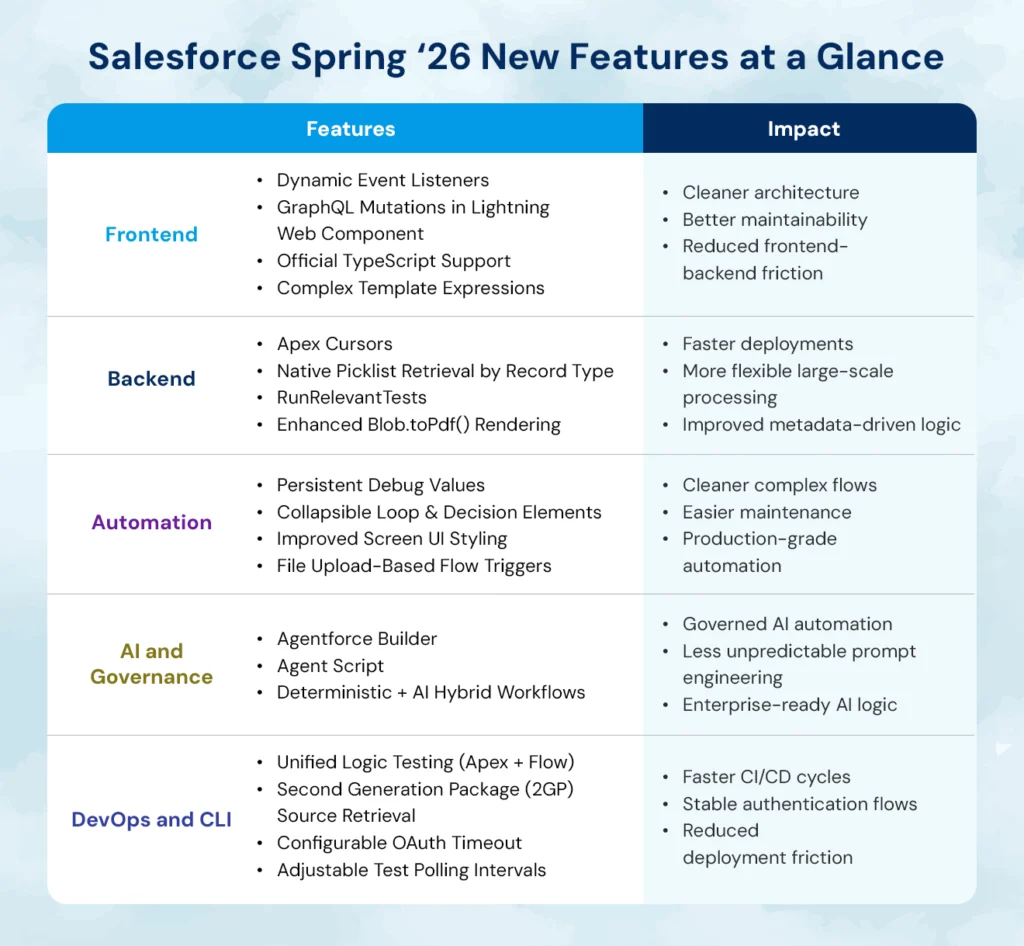
I. Lightning Web Components
Let’s start with the frontend, where Lightning Web Components (LWC) continue to mature into a robust, scalable UI layer. The Salesforce Spring ’26 developer features significantly enhance flexibility and maintainability.
Dynamic Event Listeners
Previously, if one wanted components to handle different events, they had to declare every handler inside HTML. That often led to cluttered templates or complex workarounds.
In Spring ’26, Salesforce introduced the dynamic event listener syntax:
Users define an object in JavaScript, with keys such as event names and values as functions. This lets them programmatically change component behavior without changing the HTML.
How This Helps Developers
Developers get cleaner markup, better reusability, and more flexibility, especially in dynamic UIs built for modern web experiences. They no longer need to define every event handler directly in the HTML template. Event behavior can be controlled through JavaScript objects, which keeps templates cleaner.
GraphQL Mutations Directly in LWC
Until now, GraphQL support in LWC has largely been limited to data retrieval. Mutations required Apex controllers, which added complexity and latency.
With the introduction of executeMutation() in the lightning/graphql module, developers can now perform create, update, and delete operations directly from LWC.
This shift has real architectural implications:
- It reduces server-side boilerplate.
- It simplifies micro-interactions in data-heavy applications.
- It reduces the Apex surface area for simple CRUD logic.
How This Helps Developers
From a development standpoint, GraphQL mutations in LWC enable cleaner frontend-driven architectures without sacrificing platform governance. Simple data operations no longer require separate Apex controllers. This reduces backend code and simplifies UI-driven interactions.
TypeScript Support for Base Components
Strong typing is no longer optional in modern development ecosystems. Spring ’26 delivers official TypeScript definitions for Lightning base components via the @salesforce/lightning-types package.
This enhancement introduces:
- Compile-time validation
- Improved IntelliSense
- Safer refactoring
- More predictable event typing
How This Helps Developers
TypeScript definitions help catch errors earlier during development. IDEs can provide better autocomplete and documentation for Lightning components. This makes large codebases easier to maintain and safer to refactor.
For teams managing large LWC codebases, this reduces runtime bugs and improves long-term maintainability. It also aligns Salesforce frontend development with industry best practices.
Complex Template Expressions (Beta)
Developers no longer need trivial getter methods for simple inline logic. Conditional expressions and optional chaining are now supported directly within LWC templates.
This feature reduces boilerplate and makes templates more expressive. It may appear minor, but across dozens or hundreds of components; the cumulative reduction in repetitive code is significant.
How This Helps Developers
Simple logic can now be written directly inside LWC templates. Developers no longer need to create extra getter functions for basic conditions.
Master Salesforce Implementation in 2026
II. Salesforce Spring ’26 Apex Changes
If there is one area where the Salesforce Spring ’26 release truly shines for backend developers, it is Apex.
The Salesforce Spring ’26 Apex changes focus heavily on large-scale data processing, testing efficiency, and metadata-driven logic.
Apex Cursors
Batch Apex has long been the default solution for processing large datasets. While effective, it lacks flexibility and can feel rigid.
Spring ’26 introduces Apex cursors, which allow:
- Bidirectional record navigation
- Controlled chunk fetching
- Serialization across asynchronous jobs
How This Helps Developers
Apex Cursors create more granular control over data handling, especially for integrations and ETL-style operations. In practical terms, this means developers can now build large-scale processing flows without relying exclusively on batch jobs. That flexibility gives developers more architectural freedom.
Native Picklist Retrieval by Record Type
Historically, retrieving picklist values scoped by record type required UI API callouts or multiple API requests. This added unnecessary complexity.
Spring ’26 introduces a direct Apex method for retrieving picklist values by record type in a single call.
The impact is immediate:
- Cleaner dynamic form generation
- Reduced integration overhead
- Faster metadata-driven logic execution
How This Helps Developers
Picklist values can now be retrieved directly by record type using Apex. Developers no longer need multiple API calls or UI API workarounds. This simplifies dynamic form logic and metadata-driven applications.
Targeted Test Execution
One of the most practical updates in this release is the introduction of RunRelevantTests (Beta).
Salesforce can now run only the tests related to modified metadata, rather than executing the entire org test suite.
When combined with new test annotations that define test relevance and criticality, this feature dramatically reduces deployment time.
For CI/CD pipelines, this translates into:
- Faster feedback loops
- Reduced wait times
- More frequent releases
- Higher developer productivity
How This Helps Developers
For teams practicing modern DevOps within Salesforce development, this is a transformative improvement. Salesforce can run only the tests related to modified components instead of executing the entire test suite. This significantly reduces deployment time in large orgs.
Enhanced PDF Rendering with Blob.toPdf()
PDF generation has historically been inconsistent across languages and fonts. The improved rendering engine in Spring ’26 enhances font compatibility and multibyte character support.
This matters for global enterprises generating:
- Contracts
- Certificates
- Multilingual documentation
- Invoices
How This Helps Developers
The improved reliability ensures brand consistency and fewer post-generation formatting corrections. This is especially useful for applications that produce contracts, invoices, or certificates.
Master Salesforce Development and Overcome Customization Hurdles
III. Salesforce Omni-Channel Flow Updates
Flow is no longer an admin-only tool. It is a core automation engine, and the Salesforce omni-channel flow updates in Spring ’26 reinforce that reality.
Key improvements include:
- Persistent debug values across sessions
- Collapsible decision and loop elements for canvas clarity
- Improved screen component styling
- Flow triggers based on file uploads
These enhancements do not merely improve usability. They increase maintainability for complex automation systems.
As flows grow more sophisticated, the need for cleaner visual architecture becomes critical. Spring ’26 acknowledges that complexity and addresses it directly.
How This Helps Developers
Debugging flows become easier because values persist across debug sessions. Collapsible elements help manage complex flows on the canvas. These changes make large automation workflows easier to read and maintain.
IV. AI Governance with Agentforce
AI within Salesforce is moving from experimentation to structured implementation, driving real productivity across teams and workflows. As Marc Benioff, CEO of Salesforce, said, “It can’t just be growth at any cost. There has to be some regulation.”
Spring ’26 introduces Agentforce Builder (Beta) and Agent Script (Beta), allowing developers to combine natural language processing with deterministic logic flows.
This hybrid approach ensures that AI-driven workflows remain testable and governed.
How This Helps Developers
For developers, this update means:
- Less reliance on unpredictable prompt engineering
- More structured AI behaviors
- Clearer separation between probabilistic output and rule-based logic
This evolution reflects a broader industry trend toward the responsible implementation of AI.
V. Security and Integration Changes
With the global average cost of a data breach exceeding $4 million, security improvements are not optional in modern cloud environments, and the Salesforce Spring ’26 release strengthens integration governance.
Key changes include:
- Deprecation of session ID usage in outbound messaging
- Stricter OAuth enforcement
- Connected app creation is disabled by default
How This Helps Developers
These changes push organizations toward secure, token-based authentication patterns. Legacy approaches such as session ID usage are being phased out. This helps reduce security risks in integration.
VI. Developer Tooling and CLI Enhancements
The Salesforce Spring ’26 release makes several behind-the-scenes improvements to developer tooling and the Salesforce CLI that directly impact productivity, CI/CD pipelines, and local development workflows. These enhancements focus on reliability, speed, and unifying testing experiences, even though they may not always show up as big banner features in marketing collateral.
Unified Logic Testing
Spring ’26 introduces Unified Logic Testing (Beta), a feature that lets developers execute both Apex and Flow tests in a single command. This means developers can now run all types of automated tests together, rather than separating tasks by tool or interface.
This unified approach helps:
- Integrate richer test suites into CI/CD pipelines
- Reduce context switching for developers
- Improve test coverage insights across both declarative and programmatic logic
By reducing the complexity of testing workflows, teams can gain faster feedback on code and automation behavior without juggling separate test scripts or run commands.
How This Helps Developers
Developers can run Apex tests and Flow tests together in a single command. This simplifies testing workflows in CI/CD pipelines. It also provides better visibility into how code and automation interact.
Retrieve Package Source for 2GP Artifacts
Another significant developer experience improvement is the ability to retrieve source metadata for specific Second-Generation (2GP) or unlocked package versions directly using the CLI:
sf package version retrieve –package 04tXXX –output-dir my-directory –target-dev-hub devhub@example.com
How This Helps Developers
Retrieve package source for 2GP artifacts simplifies troubleshooting and local inspection of managed package source metadata, especially for complex orgs or multi-package dependencies. It also helps maintain code consistency across environments and improve visibility into package contents.
More Reliable Authentication Handling
Authentication issues can slow down development cycles when logging into orgs via the CLI. Spring ’26 adds quality-of-life improvements to make authentication safer and more predictable.
One notable improvement is the ability to configure custom login timeout settings. This prevents the CLI from becoming unresponsive indefinitely during login or token refresh attempts:
export SF_WEB_OAUTH_SERVER_TIMEOUT=180000
How This Helps Developers
This setting provides engineers with more control over how authentication flows behave in environments with slower networks or intermittent connectivity. Developers can configure login timeouts for CLI authentication. This prevents login processes from hanging indefinitely. It improves reliability when working in slower networks or automated environments.
Configurable Test Polling and Execution Control
When the CLI runs long test suites, the frequency at which it checks for test completion can affect both API usage and developer’s wait times. Spring ’26 introduces the ability to adjust test polling intervals:
sf apex run test –class-names MyClassTest –poll-interval 5 –target-org my-org
How This Helps Developers
This improves continuous integration efficiency by allowing developers to optimize polling based on their org characteristics and reduce unnecessary API calls. It also allows teams to optimize CI/CD performance.
Better Quality-of-Life Updates for CLI Workflows
Several smaller but meaningful enhancements round out the Salesforce Spring ’26 new features related to the CLI:
- Automatic approval for read-only Model Context Protocol (MCP) tools remove redundant security prompts.
- CLI commands now avoid unnecessary reconnections when toggling settings such as auto-approval, improving responsiveness.
- Default linting and code quality rules for LWC and Apex are enabled by default to reinforce best practices from the start.
How This Helps Developers
Developers encounter fewer interruptions during routine CLI tasks. Automatic approvals and fewer reconnection prompts make commands run more smoothly. All of this leads to a smoother local development experience where developers spend less time wrestling with tools and more time building.
Broader Toolchain and IDE Support
Connected with the CLI, Spring ’26 also brings deeper integration with development environments like VS Code through extensions such as Agentforce DX. This tool enhances:
- Syntax highlighting for Agent Script
- Previewing agent conversations directly in code
- Live and simulated agent executions connected to org resources
How This Helps Developers
These improvements blur the boundary between low-code interfaces and pro-code workflows, making it easier to manage AI-driven logic from the local editor rather than through manual tooling. Features like syntax highlighting and agent previews make it easier to build and test AI-driven workflows.
Final Words
The Salesforce Spring ’26 release strengthens architectural patterns, reduces long-standing inefficiencies, and increases developer control across frontend, backend, automation, AI, and deployment pipelines.
The most impactful Salesforce Spring ’26 new features target real engineering pain points:
- Processing large datasets
- Shortening release cycles
- Improving frontend maintainability
- Strengthening AI governance
- Simplifying metadata-driven logic
For development teams in fast-moving Salesforce environments, these updates change how systems are built and maintained. Features like Apex cursors, targeted test execution, and improved LWCs make it easier to build scalable apps, manage automation, and deliver changes faster.
Overall, Spring ’26 marks a shift toward a more developer-focused platform. Teams that adopt these updates early will build faster, cleaner, and more future-ready Salesforce architectures. Explore tailored Salesforce engineering services to design and optimize your Salesforce ecosystem.