 Integration Services
 Business Consulting & Advisory
 AI Solutions
 AppExchange Development
 Tailored Salesforce Engineering
 Managed Services
 Implementation

How much does it cost when a business tool doesn’t work the way it should? For companies using Salesforce, the price tag can be enormous, not just in terms of money, but in lost opportunities and team frustration. The fundamental issue isn’t the software; it’s the approach. Many companies view Salesforce implementation as an exercise that happens once and then it’s done. However, the platform requires ongoing attention.

Without ongoing expert attention, technical problems accumulate, users become frustrated, and the system becomes obsolete when the business evolves. Research reveals that nearly 70% of software implementation projects fail or underperform against expectations. The path to success requires continuous, expert-led Salesforce development services rather than a one-time setup. Professional Salesforce.com certified developers bring the knowledge and experience to build systems that grow, adapt to new requirements, and continue generating value in the long run. This informative piece dives into why partnering with a professional Salesforce.com certified developer is essential for any business serious about making Salesforce a long-term success.
What Does Future-Proofing Salesforce Implementation Really Mean?
Future-proofing Salesforce implementation means building a Salesforce system that can grow and evolve without falling apart. The goal is to create something flexible enough to handle more work as the business needs shift, technology advances, or the company expands into new areas. A good setup today saves headaches tomorrow by being ready for whatever comes next. Explore the strategic foundations that support continuous evolution without requiring costly rebuilds.
Scalable
A scalable system can handle growth without slowing down or crashing. Today, there might be fifty people using the deployed Salesforce instance, but next year there could be five hundred. The system should not slow down or crash when more users join. More customer records, more sales data, and more daily activity should not cause performance issues. Planning growth from the start means the business can expand without worrying about the system breaking down under pressure.
Adaptable
Business requirements change constantly as markets shift and new opportunities emerge. An adaptable system can be quickly adjusted when these changes occur without major disruptions. New products, different sales processes, or expanded markets should not require rebuilding everything from scratch. The Salesforce system should adjust to fit new ways of working. Flexibility built into the implementation allows the business to pivot when needed without technical limitations holding it back.
Is a Managed Services Partner the Key to Maximizing Your Salesforce
Maintainable
A maintainable system is organized in a way that makes sense to anyone who works on it. Everything has clear labels and explanations so new team members can understand how things work without having to guess. When someone needs to make changes, they can do it safely without breaking other parts. Good maintenance practices prevent the system from becoming a confusing mess that nobody wants to touch. Future team members should be able to pick up where others left off without struggling to understand the setup.
Integrated
Modern businesses use many different software tools that need to work together smoothly. A future-proof system integrates seamlessly with the other tools the company uses. When a new application gets added, Salesforce should be able to work with it without major problems. Data flows between systems automatically, eliminating the need for manual copying. Planning these connections from the beginning makes adding new tools easier as the business adopts more technology to support its operations.
Key Phases of Salesforce Implementation
| Phase | Key Milestones | Typical Duration |
|---|---|---|
|
Discover & Plan |
|
2-4 Weeks |
|
Design & Prototype |
|
3-5 Weeks |
|
Develop & Configure |
|
4-12 Weeks |
|
Test & Validate |
|
2-4 Weeks |
|
Deploy & Launch |
|
1-2 Weeks |
|
Support & Scale |
|
Ongoing |
What Are the Common Pitfalls in Future-Proofing Salesforce Implementation?
Discover the hidden obstacles in future-proofing Salesforce implementation. Dive into these prevalent pitfalls that can derail your CRM strategy. Learn essential lessons from common challenges to build flexible, future-proof solutions that support continuous business expansion and transformation.
I. Technical Debt
Technical debt arises when quick fixes and shortcuts pile up over time rather than being implemented properly. Teams often choose quick fixes to meet deadlines, planning to fix them later. However, that later rarely comes, and these temporary fixes become permanent. Each shortcut makes the Salesforce system messier and harder to change. The system becomes fragile, where one small change can break multiple things. Eventually, the accumulated debt becomes so large that major portions need to be rebuilt entirely, which costs much more than doing things right from the start.
II. Lack of Data Architecture Strategy
When businesses start using Salesforce without planning how data should be organized, problems multiply quickly. Information gets stored in random places without a clear structure or relationships. Different teams create their own ways of storing similar information, leading to confusion and duplication. As more data gets added, finding anything becomes increasingly difficult. Reports become unreliable because the same information exists in multiple places with different values. The Salesforce system performs poorly when data lacks logical order. Without a clear plan for how information should be structured, the database turns into a messy storage room where nothing can be easily found.
III. Governance Gaps
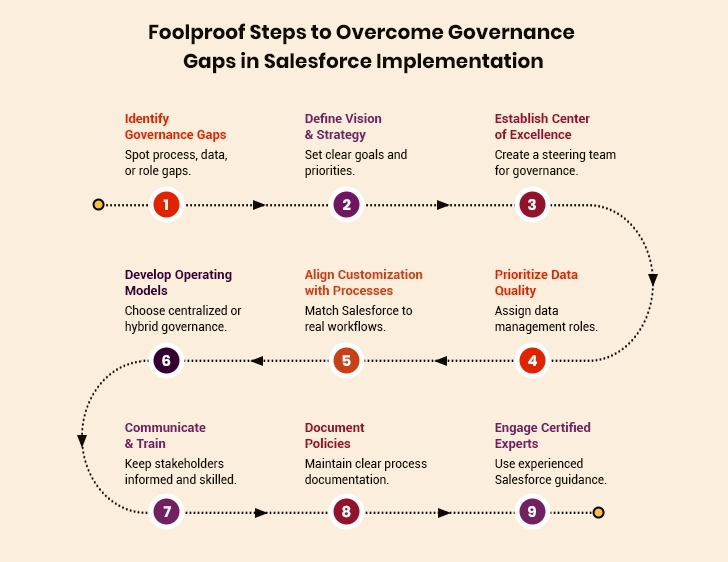
Governance gaps occur when there are no clear rules about who can make changes and how those changes should be implemented. Different users modify the Salesforce system in conflicting ways because nobody coordinates their work. Standards do not exist for naming things, building processes, or storing information. Some changes get tested thoroughly while others go straight into production without review. Nobody takes responsibility for overall system quality since ownership is unclear. Security settings get configured inconsistently, creating potential vulnerabilities. Without proper governance from an expert Salesforce development company, the system evolves chaotically rather than strategically. Quality also deteriorates since there is no mechanism to maintain standards or prevent poor decisions.
IV. Organizational Inertia
Organizational inertia refers to resistance against change even when improvements are clearly needed. Employees get comfortable with how things currently work and fear learning new approaches. Teams continue using outdated processes since changing requires effort and coordination. Decision-making moves slowly as approvals pass through multiple levels of management. New Salesforce features go unused since adopting them requires changing established practices. The Salesforce system cannot evolve to meet changing business needs when the organization resists adaptation. This resistance eventually makes the Salesforce investment less valuable because the platform is not being used to its full potential.
How Salesforce Development Partners Drive Continuous Innovation
What Are the Best Practices for Future-Proofing Your Salesforce Implementation?
Protect your Salesforce investment for years to come. Explore these essential best practices that ensure your implementation remains future-proof, scalable, and aligned with evolving business needs. Discover strategies that guarantee long-term success and adaptability.
1. Adopt Modular Design with Packaging
Break your Salesforce setup into smaller pieces called packages using Second Generation Packaging. This approach follows the Separation of Concerns principle in software design. Each package handles specific functionality independently. Testing becomes simpler when changes affect only isolated components. Multiple teams can work on different packages without creating conflicts. Updates and deployments happen faster with reduced risk of breaking existing functionality.
2. Use Declarative Tools
Salesforce offers two ways to build solutions: declarative tools or custom code. Declarative tools like Flow Builder and Process Builder should be the first choice. These tools receive automatic updates from Salesforce with each release cycle. Custom code requires manual review and modification after every platform update. The declarative approach reduces maintenance overhead and ensures compatibility with future versions. This strategy minimizes technical debt and keeps implementations aligned with platform evolution.
“The most sustainable and maintainable Salesforce orgs are built on a bedrock of declarative logic. It’s the key to lowering your Total Cost of Ownership over a 10-year horizon.”
– Brian Millham, President and Chief Operating Officer, Salesforce.
3. Embrace Advanced Analytics and AI Adoption
Einstein Prediction Builder creates custom AI models without writing code. This tool learns from historical data and automatically predicts future outcomes. Tableau CRM turns raw data into visual dashboards that get updated in real time. These platforms evolve with Salesforce updates, ensuring analytics capabilities stay relevant. Building analytics early helps organizations spot trends and make smarter decisions as data grows over time.
4. Stay Updated with Release Readiness
Salesforce updates three times every year with new features and changes. Join the release readiness program to learn what’s coming. Read the release notes in simple versions. Test upcoming changes in your sandbox before they go live. Turn on critical updates gradually. Some old features get retired through the deprecation process, so you need time to switch to new methods without rushing.
5. Use API Version Strategy
APIs act like bridges that connect Salesforce to other programs. Each bridge version works differently. Always use the current API version for new projects, but understand that older versions will stick around. Keep a list of versions each connection uses. When Salesforce announces the retirement of an older version, you should plan to upgrade. Avoid waiting until the last minute because testing takes time.
6. Implement Change Management Process
Setting up proper sandbox environments creates safe spaces for building and testing changes. Every change should go through development, testing, and production stages using different sandboxes. Use Change Sets or DevOps tools like Copado to safely move changes. Always have a rollback plan ready in case something goes wrong after release.
7. Manage Technical Debt
Over time, quick fixes and temporary solutions accumulate into technical debt. This debt makes the system harder to maintain and slows down future development. Regularly addressing these shortcuts prevents them from compounding into major problems. Allocating time to clean up and optimize existing work keeps the system healthy. Ignoring technical debt eventually forces major overhaul efforts that disrupt operations. Treating debt management as ongoing maintenance rather than optional keeps the platform running smoothly.
8. Monitor and Optimize Performance
Check your Salesforce speed regularly using tools like Event Monitoring and Optimizer. Look at how long pages take to load and where automation slows down. The Health Check tool shows security scores. Set up monthly Performance Dashboards to track trends. Regular cleanup keeps everything running fast.
9. Plan for Integration
Businesses rarely use just one software system, so planning integrations is crucial. Building integration capabilities into the initial design makes adding new tools easier later. Choosing integration methods that scale prevents bottlenecks as data volumes grow. Furthermore, using middleware platforms like MuleSoft or Boomi creates a central integration layer that manages all connections. These middleware solutions handle data mapping, transformation, and error management between different systems. When one system changes, only the middleware connection needs updation, eliminating the need to rebuild everything. This approach makes adding new software much simpler because the foundation already supports over 5,000 applications, providing comprehensive options for customization and integration.
10. Invest in User Training and Adoption
The best Salesforce setup fails if people don’t use it properly. Create simple training videos and quick reference guides using Salesforce’s built-in training tool, myTrailhead. Assign learning paths based on job roles. Measure adoption through Login History and Feature Usage reports. Celebrate teams that use Salesforce well. Talk to users regularly to understand their struggles and fix frustrating parts quickly.
Summing Up
Salesforce can be transformative for any business, but only when it’s implemented correctly. As we’ve explored throughout this article, successful Salesforce implementation requires careful planning, expert guidance, and following proven practices. Companies that skip these steps often end up costing more in the long run. For organizations wanting to future-proof their Salesforce investments, partnering with experienced a Salesforce development company isn’t optional; it’s essential.