 Integration Services
 Business Consulting & Advisory
 AI Solutions
 AppExchange Development
 Tailored Salesforce Engineering
 Managed Services
 Implementation

Can insurance agents afford to manage client relationships without modern software anymore? The honest answer for most is no. Between managing existing policies, tracking policy renewals, dealing with claims, and staying compliant with regulations, the complexity has grown beyond what manual methods can handle reliably. The professionals who solve this problem with the right tools are the ones who thrive.
Data reveals that 91% of companies with 10 or more employees use a CRM in their organization. The right tools help brokers, agents, and carriers stay organized, respond faster, and spend less time on repetitive tasks. This detailed guide walks through the critical features insurance professionals should look for, reviews the best options the market offers, and provides a clear framework for selecting the best insurance CRM software that improves daily operations rather than adding complexity.

What Are the Key Features to Look for in Insurance CRM Software?
Knowing what features to prioritize helps you choose the right CRM. Explore the essential features from policy management to reporting and analytics that make insurance CRM software valuable.
1. Policy Management and Tracking
The CRM software for insurance brokers must track all policy details in one central location. This includes policy numbers, coverage amounts, premium dates, renewal schedules, and carrier information. Your team needs to see complete policy histories for each client without searching through multiple systems or paper files.
Good insurance CRM software automatically alerts you when policies are up for renewal, so you never miss important dates. The system should track policy changes, endorsements, and claims history over time. This complete view helps agents provide better service and identify opportunities for additional coverage that clients might need.
2. Commission Tracking and Management
CRM for insurance agents should calculate and track commissions automatically from different insurance carriers. The system needs to handle various commission structures, including flat rates, percentage-based payments, and tiered commission levels. Agents want to see their earnings without manual spreadsheet calculations that waste time and create errors.
Insurance CRM software generates commission reports showing what you’ve earned from each policy and carrier. This feature helps brokers understand which products and carriers are most profitable. Accurate commission tracking also simplifies tax preparation and helps resolve payment disputes with insurance companies when amounts don’t match expectations.
3. Client Contact and Communication History
Insurance agents need complete records of every conversation, email, and meeting with each client stored in one place. The best CRM for insurance brokers logs phone calls, emails, text messages, and in-person meetings automatically. This history ensures any team member can help a client even if the original agent is unavailable.
Communication tracking prevents embarrassing situations where you ask clients for information they have already provided. The system should show when clients were last contacted and what was discussed. This feature helps maintain consistent follow-up and ensures important conversations don’t fall through the cracks during busy periods when managing many clients.
4. Automated Renewal Reminders and Workflows
Insurance CRM software sends automatic reminders to both agents and clients about upcoming policy renewals. The system can trigger email sequences starting 90 days before renewal, asking clients to review their coverage. Automated workflows ensure no policies lapse because someone forgot to follow up at the right time.
These automation features free agents from manually tracking renewal dates in calendars or spreadsheets. The best CRM for insurance brokers can automatically create tasks for agents to call high-value clients personally before renewals. The system keeps the renewal process moving smoothly even when agents are busy with new business or handling claims.
5. Lead Management and Pipeline Tracking
Insurance agents need to track potential clients from first contact through policy purchase in an organized pipeline. The best CRM for insurance agents shows which leads are hot prospects ready to buy versus cold leads needing more nurturing. Visual pipeline displays help you focus time on opportunities most likely to close soon.
Lead scoring features rank prospects based on their likelihood to purchase and potential policy value. Top insurance CRM software automatically assigns leads to appropriate agents based on territory, specialty, or workload. The system tracks lead sources showing whether referrals, website inquiries, or advertising campaigns generate the best clients for your agency.

6. Mobile Access for Field Agents
Insurance agents working in the field need access to client information, policies, and documents from their phones or tablets. CRM for insurance agents with mobile apps lets agents look up policy details while meeting clients at their homes or businesses.
The mobile version should let agents add notes, schedule follow-ups, and update client information from anywhere. Top insurance CRM software syncs changes made on mobile devices back to the main system automatically. Field agents stay productive throughout the day instead of waiting until evening to update records from memory when details get fuzzy.
7. Carrier Integration and Data Exchange
Insurance CRM software connects directly with insurance carrier systems to exchange information automatically. Integration eliminates manually typing client data into multiple carrier websites when requesting quotes or submitting applications. Direct connections reduce errors that happen when copying information between systems by hand.
Carrier integration lets you download policy information, commission statements, and renewal data directly into your CRM for insurance brokers. The system can automatically update policy statuses when carriers bind coverage or process changes. These connections save hours of administrative work and keep your records synchronized with carrier systems without constant manual updates.
8. Reporting and Analytics Dashboard
Insurance CRM software provides dashboards showing important metrics like policies sold, premium volume, retention rates, and revenue trends. Agents and managers need to see performance data without requesting IT reports or building complex spreadsheets. Visual charts and graphs make it easy to understand business health at a glance.
The best CRM for insurance brokers generates reports on agent productivity, policy types sold, and client acquisition costs. Analytics help identify which marketing efforts bring valuable clients and which products generate the most revenue. Good reporting tools let you filter data by time period, agent, policy type, or carrier to answer specific business questions quickly.
“The most sophisticated insurance CRMs are now leveraging external data streams from telematics and IoT to climate models to create dynamic, hyper-personalized customer profiles that go far beyond static demographics.”
– Matthew Wong, Former Managing Analyst, Financial Services, CB Insights.
What Is the Best Insurance CRM Software for 2026 and Beyond?
The top insurance CRM software balances current needs with future readiness. Learn about the top platforms recognized for performance, customer satisfaction, and staying relevant as technology evolves.
I. Achieva’s InsuraCRM
Achieva’s Insura is a customer management system built specifically for insurance companies, agents, and brokers. It brings together policy information, claims data, customer details, and agent records into one organized place. The software helps insurance teams track leads, create quotes, manage policy renewals, and update claim status, all from a single screen. Insura runs on the Salesforce platform and includes AI features to make work faster and easier.
The system uses artificial intelligence to answer customer questions automatically, detect fraud, and predict claim costs. It sends automatic reminders for policy renewals and helps agents know which leads to contact first. Insura keeps a complete record of all customer interactions and documents, so nothing gets lost or forgotten. The software can be customized to match how each insurance business operates, making workflows smoother and faster.
Why Choose InsuraCRM?
- Drive revenue growth through effective upselling and cross-selling
- Increase productivity by automating routine and repetitive tasks
- Gain a competitive advantage with insurance-specific CRM software designed for speed
- Enhance customer experience by providing a 360-degree view of the customer
II. Salesforce Financial Services Cloud

Salesforce Financial Services Cloud is a customer management system made specifically for insurance companies and agents. It helps keep track of all client information, policies, and communications in one place. The software lets agents see a complete picture of each customer’s needs and insurance history. It works on computers, phones, and tablets, so agents can access information anywhere.
Salesforce led all CRM vendors with a 20.7% share, serving over 150,000 businesses worldwide. The system connects with many other insurance tools and makes daily tasks easier. Agents can set reminders for policy renewals, track leads, and manage their sales pipeline. The software also creates reports that show how well the business is performing. It’s used by small insurance agencies and large companies alike because it can grow with the business.
| Pros | Cons |
|---|---|
|
Flexible and can be customized for any insurance business |
Expensive compared to other insurance CRM options |
|
Robust mobile app for working outside the office |
Takes time to learn all the features properly |
|
Plenty of training resources and a helpful community |
Needs technical help to set up and customize |
|
Reliable system that rarely crashes or encounters problems |
Can be too complicated for small insurance carriers |
|
Regular updates with new features and improvements |
Extra costs for add-ons and additional features |
III. HubSpot CRM

HubSpot CRM is a popular customer management system that many insurance agents use to grow their business. It started as a marketing tool but now includes features for managing clients and tracking sales. The software is free to start with basic features, making it attractive for new insurance agents. HubSpot helps agents organize contacts, track emails, and manage their sales process in a simple way.
The system includes tools for creating email campaigns and tracking which clients open them. Agents can see their entire pipeline of potential customers in one view. HubSpot works well on computers and mobile devices, keeping information synced everywhere. The software connects with many other tools that insurance agents already use. It’s known for having a clean, modern interface that’s easy to understand without much training.
| Pros | Cons |
|---|---|
|
Free plan available with unlimited contacts |
No direct connections to insurance carriers |
|
Easy to learn and start using immediately |
Advanced features require expensive paid plans |
|
Clean, modern interface that looks professional |
Not built specifically for insurance industry needs |
|
Strong email marketing and automation features |
Limited policy and commission tracking capabilities |
|
Excellent training materials and helpful resources |
Reporting features are basic in the free version |
IV. Zoho CRM for Insurance
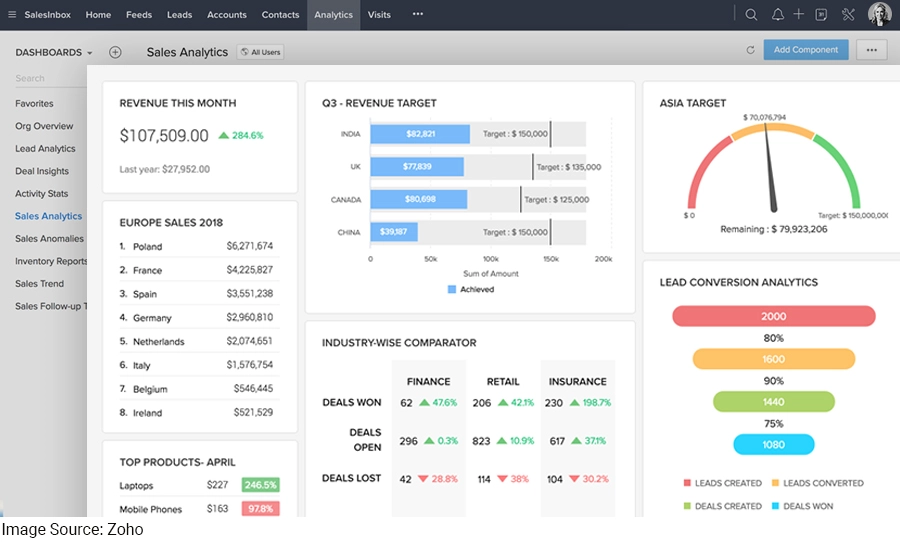
Zoho CRM is a general customer management system that works well for insurance agents. It’s not made only for insurance, but many agents use it successfully. The software helps track leads, manage customer relationships, and automate follow-up tasks. Zoho CRM is known for being affordable and easy to customize without technical help.
The system includes tools for email marketing, calling clients, and tracking all communications. Agents can create custom fields to store insurance-specific information like policy numbers and renewal dates. Zoho CRM works on phones and tablets with a good mobile app. The software connects with many other business tools through integrations. It’s popular with new insurance agents and small agencies because of the low cost and flexibility.
| Pros | Cons |
|---|---|
|
Affordable, with a free plan available |
Not specifically designed for insurance the industry |
|
Easy to customize without technical knowledge |
No built-in carrier integrations |
|
Good mobile app for on-the-go access |
Limited policy and commission management features |
|
Connects with many other business tools |
Requires manual setup for insurance workflows |
|
Regular updates and new features added |
Support can be slow for lower-priced plans |
V. Applied Epic

Applied Epic is designed specifically for insurance agencies of all sizes. It combines customer management with policy tracking and commission management in one system. The software helps agents manage their entire book of business from start to finish. It includes tools for quoting, binding policies, and processing renewals automatically.
The system stores all client documents, emails, and notes in an organized way. Agents can create tasks and set up workflows that repeat for common insurance processes. Applied Epic connects directly with many insurance carriers, making it faster to get quotes and submit applications. The software has been around for many years and is recognized as the best CRM for insurance companies.
| Pros | Cons |
|---|---|
|
Made specifically for insurance agencies and their needs |
Expensive, especially for small agencies |
|
Strong carrier integration saves time on quotes |
Interface looks old-fashioned to some users |
|
Good customer support with insurance industry knowledge |
Requires training to use all features effectively |
|
Handles complex commission structures well |
Can be slow when processing large amounts of data |
|
Includes accounting features for agency management |
Customization options are limited compared to others |
Best Insurance CRM software – A Quick Comparison
| Feature | InsuraCRM | Salesforce FSC | HubSpot CRM | Zoho CRM | Applied Epic |
|---|---|---|---|---|---|
|
Claims Management |
Yes (With AI prediction) |
Yes |
No |
No |
Basic tracking |
|
Policy Management |
Yes (Complete lifecycle) |
Yes (Comprehensive) |
Limited (Manual setup needed) |
Limited (Manual setup needed) |
Yes (Complete with quoting and binding) |
|
Renewal Reminders |
Yes (Automatic with AI) |
Yes (Automatic) |
Yes (Manual setup) |
Yes (Manual setup) |
Yes (Automatic) |
|
Workflow Automation |
Yes |
Yes (Highly customizable) |
Yes (Good automation) |
Yes (Good automation) |
Yes (For insurance processes) |
|
Lead Scoring |
Yes (AI-powered) |
Yes |
Available in paid plans |
Available in paid plans |
Basic lead tracking |
|
Fraud Detection |
Yes (AI-powered) |
Limited |
No |
No |
No |
How to Choose the Right Insurance CRM Software?
Selecting the right insurance CRM takes careful thought and evaluation. Check out the key selection steps from defining requirements to running a pilot that ensure you choose wisely.
1. List Down Your Specific Needs
Write down exactly what problems you need the CRM software to solve. Do you struggle with tracking renewals, managing commissions, or organizing client documents? List the insurance types you sell and how many agents will use the system daily. Your specific requirements guide which features matter most.
2. Check Insurance Industry Specialization
Choose CRM software built specifically for insurance agencies rather than generic business software. Insurance-specific systems understand policy lifecycles, renewal processes, commission structures, and carrier relationships. Generic CRMs require expensive customization to handle insurance workflows properly. Specialized systems work better right out of the box for insurance operations.
3. Test Mobile Functionality Thoroughly
Download Insurance CRM mobile apps and test them during your evaluation of the best free CRM for insurance agents, brokers, and carriers. Try looking up client information, adding notes, and accessing documents from your phone. Field agents need mobile access that works smoothly, not clunky interfaces that frustrate users. Poor mobile experience means agents won’t use the software when away from their desks.
4. Verify Carrier Integration Options
Identify which insurance carriers connect directly with the best insurance CRM software you are considering. Direct carrier integrations save massive amounts of data entry time and reduce errors. Find out if the software connects to the specific carriers your agents and brokers work with most. Insurance CRM software without your key carrier connections creates extra manual work daily.
5. Evaluate Training and Support Quality
Request training materials and contact support teams before buying any CRM for insurance brokers. Check response times by asking questions during your trial period. Find out if training is included or costs extra. Poor support leaves your agents struggling with problems that hurt productivity. Good vendors provide quick help through phone, email, or chat when issues arise.
6. Calculate Total Cost of Ownership
Add up all costs, including monthly fees, setup charges, training expenses, and integration costs. Some vendors charge extra for features, like mobile access, carrier integrations, or additional users. Compare total costs over three years, not just initial prices. Hidden fees make cheap options expensive over time.
7. Run a Pilot with Your Team
Have a few agents test the top insurance CRM software with real client data before committing your entire agency. Watch how they use the system and ask about frustrations or confusing features. A pilot reveals practical problems you miss during demos. Agent feedback determines if the system improves daily work or creates new headaches.
Drive Impact with Achieva’s Strategic Insight
After exploring essential features, top software options, and selection strategies, one truth stands clear: the right software choice dramatically impacts insurance business success. This guide has provided the knowledge brokers, agents, and carriers need to evaluate options effectively and select software that genuinely fits their operations rather than forcing operations to fit poorly designed software.
Moving forward, apply the evaluation framework systematically. Identify must-have features based on daily workflow, test usability with actual team members, and verify customer support quality before purchasing. Those who invest time selecting software carefully will enjoy systems that simplify operations, strengthen client relationships, and enable growth without the headaches that come from choosing poorly or hastily. If you need expert help in making an informed decision, you may seek help from Achieva’s certified insurance professionals.