 Integration Services
 Business Consulting & Advisory
 AI Solutions
 AppExchange Development
 Tailored Salesforce Engineering
 Managed Services
 Implementation

Imagine being a Salesforce admin at a leading insurance company. While it gives you the rush of acting as a bridge between technology and industry, juggling multiple workflows, handling customer data, and updating processes daily is a nuisance. Suddenly, a regulatory audit is announced, and you start panicking. Where are the logs? Who had access to sensitive data? Were deletion requests handled timely? This kind of chaos is more common than you’d think.

Compliance isn’t just about following rules. It’s about protecting your business, your customers, and your peace of mind. And doing it manually is a slow, risky game. That’s where smart policy enforcement comes in.
Let’s explore how businesses can embed intelligent compliance into their Salesforce projects.
Table of Content
- What Is Compliance in Salesforce Projects?
- Why Doesn’t Manual Compliance Work Anymore?
- What Is Smart Policy Enforcement?
- A Practical Illustration of Compliance Automation in Custom Salesforce Projects
- What Are the Benefits of Automating Compliance in Salesforce Custom Projects?
- Why Shouldn’t You DIY Compliance Automation?
- How Does Salesforce Development Services Help Automate Compliance?
- How Does AI Power Compliance in Salesforce Workflows?
- Final Thoughts
- FAQs
What Is Compliance in Salesforce Projects?
Compliance in the Salesforce world typically defines adherence to legal, regulatory, and organizational standards in handling data, user access, and process workflows. In Salesforce projects, compliance ensures your system behaves lawfully, ethically, and predictably.
The common compliance standards include:
- GDPR: Protecting customer data for EU citizens
- HIPAA: Managing health information securely in healthcare apps
- SOC 2: Ensuring secure, confidential systems for service providers
- Internal Policies: Enforcing approval chains, audit logs, or permission boundaries
When Salesforce custom development is involved, compliance must be baked into the solution, not added as an afterthought.
Why Doesn’t Manual Compliance Work Anymore?
Let’s face it that manual compliance checks are painfully slow, messy, and error prone. Teams often struggle to handle countless emails, spreadsheets, and Slack messages required to ensure a single compliance enforcement. Here’s what happens when compliance is manual:
- Approvals get lost in inboxes
- Users access data they shouldn’t
- Audit logs miss key actions
- Teams waste hours fixing what automation could prevent
Smart businesses now demand automation baked into their Salesforce custom development. Rather than band-aid fixes, they want self-correcting systems.
What Is Smart Policy Enforcement?
Smart policy enforcement is all about using logic, automation, and alerts to enforce compliance policies directly within Salesforce workflows. It swaps manual checks with intelligent, rule-based controls. This helps teams avoid slip-ups while keeping processes fast, accurate, and audit ready.
Here’s how it works:
| Smart Element | What It Does | Example |
|---|---|---|
|
Validation Rules |
Blocks non-compliant actions |
Prevents closing opportunities without legal review |
|
Flows and Process Builders |
Automates approvals and alerts |
Sends real-time alerts when high-risk data is accessed |
|
Audit Trails |
Tracks changes in real time |
Records every field change in custom objects |
|
Permission Sets |
Limit access based on roles |
Ensures junior agents can’t export sensitive reports |
A Practical Illustration of Compliance Automation in Custom Salesforce Projects
“Being a trusted cloud service provider is our top priority, and our adherence to the EU Cloud Code of Conduct demonstrates our services’ security and privacy practices align with GDPR requirements” – Jo Copping, Vice President, Associate General Counsel, Privacy, EMEA, Salesforce
Imagine a European company using a custom app built on Salesforce. It handles thousands of customers records every day. However, it faces various challenges as GDPR requires them to:
- Store only the necessary data
- Let users request data deletion
- Encrypt personal info
- Track who accessed what and when
Here’s how smart compliance automation fixes the challenges:
- Custom Apex triggers flag and removes sensitive data older than 90 days
- Record-level security restricted access to only those who needed it
- Flow-based user request handling allows easy “Right to Erasure” submissions
- Platform encryption ensures data at rest meets EU standards
Automating the tasks mentioned above eliminates manual tracking and violations.
Ready to automate compliance in your Salesforce projects?
What Are the Benefits of Automating Compliance in Salesforce Custom Projects?
“Incorporating compliance considerations early on ensures they become part of the software’s foundational architecture, reducing the need for engineers to add controls after the fact. This proactive approach often reduces the expensive and burdensome task of retrofitting compliance controls later in the cycle and allows for products to achieve certifications quickly after launch. – Lokesh Ramani, Vice President of Security, Salesforce – Lokesh Ramani, Vice President of Security, Salesforce
Salesforce has over 150,000 customers worldwide, and many of them operate in regulated industries like finance, healthcare, and insurance. This makes compliance essential.
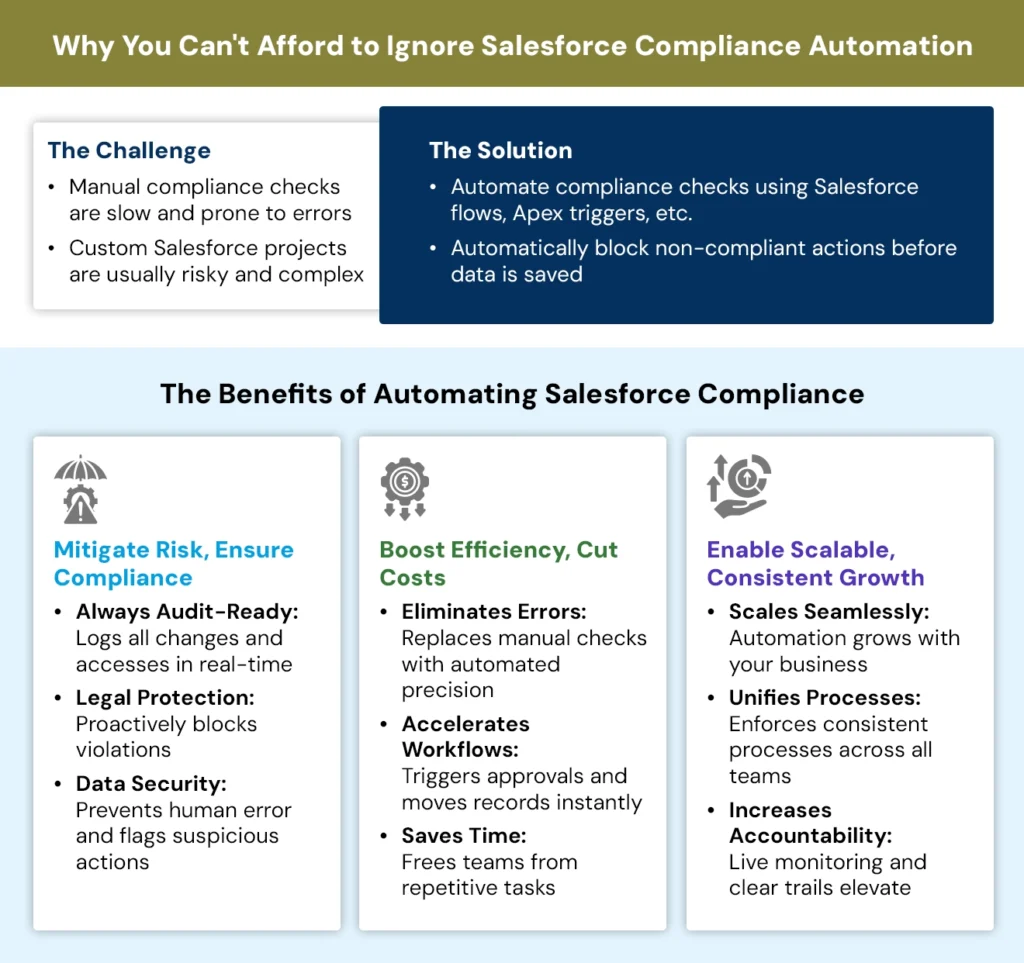
Automating compliance in Salesforce custom projects saves time and reduces human errors. It keeps your processes consistent and always audit-ready. This helps you stay safe from penalties while improving user trust. It also frees your team to focus on strategic work instead of chasing manual checks.
The following infographic highlights the core reasons why companies are switching to automated compliance:
1. Minimizes Manual Mishaps
Manual errors sneak into workflows more easily than you think. Typos, missed fields, or unintentional data overwrites can spiral into big problems. Smart policy enforcement in Salesforce ensures each step happens with robotic precision. You set the rules once, then let the system take the reins, thereby eliminating guesswork.
With Salesforce custom development, even complex business rules are embedded into day-to-day operations. The system prompts the user, restricts incorrect actions, and logs every change. That means fewer surprises.
For companies managing sensitive data or high-stakes transactions, this automation is essential. A Salesforce developer can fine-tune these safeguards to fit your exact needs.
Pro Tip:
When building flows for user rights like “Right to be Forgotten” under GDPR, always test with dummy data first. It avoids accidental data wipes during early testing.
2. Keeps You Legally Airtight
Staying compliant with data protection laws is no longer optional. Whether it’s GDPR, HIPAA, or local financial regulations, smart policy enforcement helps you tick all the boxes without lifting a finger. Compliance rules are built directly into your Salesforce system. That means no last-minute checklists or frantic audits. Everything is tracked, enforced, and time stamped.
Salesforce development services can tailor these frameworks to your industry. The system blocks violations before they happen. When you hire a Salesforce developer to handle these rules, you protect your business from regulatory misfires.
3. Ensures Audit-Ready Records
Audits shouldn’t feel like walking a tightrope blindfolded. With smart policy enforcement, your Salesforce instance is always audit-ready.
Every activity, every record update, and every policy trigger gets logged automatically. You no longer depend on sticky notes, memory, or scattered spreadsheets. When regulators come calling, your system speaks for itself.
4. Unifies User Behavior
In many businesses, one team’s way of doing things can clash with another’s. That leads to confusion, friction, and inconsistent data. Smart policy enforcement brings all users onto the same playing field. From sales reps to customer support, everyone follows the same process flow. The system won’t let them deviate.
Salesforce development services make this possible by embedding guardrails directly into the platform. You don’t need to train everyone in ten different ways. The system becomes the trainer. This uniformity breeds clarity, and clarity leads to efficiency. Over time, smart policies build a rhythm that helps your business hum.
Let Compliance Lead Your Next Salesforce Project
5. Fortifies Your Data
Data leaks don’t always come from hackers. Sometimes, they’re caused by simple oversights, such as wrong clicks, excess permissions, or weak workflows.
Smart policy enforcement limits access, flags suspicious actions, and closes loopholes. Your sensitive information stays locked down. With Salesforce custom development, access control can be precise. You can restrict fields, tabs, or even actions based on role or geography.
If you hire a Salesforce developer who knows your industry, they’ll build a fortress around your most valuable data assets.
6. Accelerates Workflow Execution
A sluggish process is the silent killer of productivity. When every step requires a manual review or an additional email, progress gets bogged down.
Smart policy enforcement cuts through the red tape. It moves records automatically, triggers alerts instantly, and enforces approvals without delay. Your workflows are fast-tracked.
With the help of Salesforce development services, you can map and automate every process end-to-end. The result? Teams spend less time pushing buttons and more time doing what truly matters. This boost in velocity gives you a tangible edge in fast-moving markets.
7. Shrinks Operational Costs
Manual compliance checks are a financial black hole. You spend time, effort, and human power catching mistakes that never should’ve happened.
Smart enforcement eliminates the need for so many layers of review. The system checks itself. A Salesforce developer agency can design intelligent workflows that spot and stop issues before they cost you. Whether it’s avoiding fines or cutting admin overhead, automation pays for itself. This does not replace people; it frees them from mind-numbing tasks. That way, your team can focus on strategic work instead of chasing down errors.
8. Scales with Business Growth
Manual systems break when businesses grow. What worked for 50 employees fails when you have 500. Smart policy enforcement scales up effortlessly. As your operations expand, the system continues to apply the same logic and protections. There’s no need to re–train every new hire or rewrite your SOPs.
Salesforce custom development makes this scalability real. With well-structured automation, your rules grow with your business. When you hire Salesforce developers early in your scaling journey, you future-proof your operations. Growth should feel exciting, not chaotic. Smart enforcement makes it feel like controlled chaos at most.
9. Reduces Legal Exposure
Lawsuits, fines, and public scandals often start from one tiny mistake. One forgotten checkbox or unauthorized email can unravel everything. Smart policy enforcement blocks these issues at the root. You can’t skip steps or misuse data because the system simply won’t let you.
Salesforce development services offer automated safeguards that act like legal shock absorbers. They catch errors before they become liabilities.
A good Salesforce developer agency aligns these policies with your legal team’s expectations. That way, you’re not just reacting, you’re shielding your business from the start.
10. Elevates Team Accountability
Smart policy enforcement makes it crystal clear who did what and when. This eliminates more vague explanations or finger-pointing. Every step is documented and timestamped. When teams know their actions are tracked fairly, accountability naturally increases. They follow the process not out of fear, but out of clarity.
11. Enables Live Monitoring
Real-time insight is a superpower. Smart enforcement tools provide live feedback when something goes wrong. You don’t find out about policy violations weeks later. The system notifies you instantly. Whether it’s a record skipped for approval or a login attempt from an odd location, you’re alerted right away.
With custom compliance-driven Salesforce implementations, these triggers can be fully personalized. You choose what counts as an “incident” and how the system should respond. This gives your admins eyes everywhere.
Fun Fact:
Salesforce Shield includes Event Monitoring that logs over 50 types of user interactions. This lets you track who did what and when.
12. Increases Decision Accuracy
Good decisions need good data. Smart enforcement makes sure your inputs are clean, complete, and compliant. If someone enters faulty information, the system blocks or flags it. This ensures that reports and dashboards show the real picture.
Salesforce developer agencies can build custom validations that align with your strategy. With more accurate data, your leaders can trust their numbers. It removes the fog from forecasting and makes goal setting far more precise.
13. Simplifies Employee Training
New hires are often overwhelmed with compliance. Dozens of rules, exceptions, and steps can cause significant confusion, but smart policy enforcement becomes a guide. The system prompts the user with what’s required at each stage. They don’t need to memorize processes.
A Salesforce developer can integrate helpful hints, tooltips, and on-screen reminders. Over time, users build confidence by simply doing the right thing because the system helps them. As a result, training is faster, smoother, and less prone to error.
14. Eliminates Redundant Tasks
Without automation, compliance often means double-entry or double-checking everything. Smart enforcement clears that clutter. The system ensures each task is done right the first time. There’s no need for a second pair of eyes on every form.
Salesforce development services can automate checks, validations, and approvals. This reduces unnecessary steps while still maintaining control. You get leaner operations and fewer repetitive tasks that drag your team down.
15. Instills a Culture of Responsibility
Smart policy enforcement changes the mindset of your employees. When users interact with automated policies daily, they internalize the rules. It has become second nature. The culture shifts from reactive to proactive.
A Salesforce developer agency can design flows that make compliance feel like part of the job, not a burdensome afterthought. Over time, this builds a team that thinks about security, quality, and accountability by default. That kind of culture isn’t easy to build, but automation makes it a lot more attainable.
Why Shouldn’t You DIY Compliance Automation?
While Salesforce is powerful, it’s also complex. Building compliance logic incorrectly can create more problems than it solves. When you hire Salesforce developer teams without compliance experience, you risk:
- Creating spaghetti logic in Flows and Apex
- Over-engineering permission sets
- Breaking existing functionality during updates
- Missing key edge cases during testing
That’s why businesses rely on proven Salesforce development services to get it right the first time. Here’s how working with a Salesforce developer agency compares to doing it all yourself:
DIY vs. Expert-Led Compliance
| DIY Approach | Expert-Led Approach |
|---|---|
|
Risk of misconfigured automation |
Well-structured and error-free automation |
|
Overuse of default permissions |
Granular, role-based access is built in |
|
Time-consuming troubleshooting |
Quick fixes and expert testing |
|
Limited foresight on regulations |
Experience with industry-specific rules |
|
Generic solutions |
Tailored Salesforce custom development |
How Does Salesforce Development Services Help Automate Compliance?
Custom compliance automation is methodical. And it starts with working with a skilled Salesforce developer. However, hiring Salesforce developers who understand both code and compliance is essential. Here’s what expert agencies bring to the table:
- Discovery workshops to map regulations to processes
- Custom workflows that don’t just mimic, but upgrade compliance
- Code-based controls that override out-of-the-box gaps
- Testing and audits to simulate risk and verify policy enforcement
Pro Tip:
Consider hiring Salesforce developer teams that specialize in regulated industries such as healthcare, finance, and insurance.
How Does AI Power Compliance in Salesforce Workflows?
With AI-native features entering Salesforce, compliance is evolving again. However, according to Salesforce research, nearly half of IT leaders lack confidence in their ability to deploy AI agents with proper compliance guardrails. Safe implementation, therefore, depends on strong automation and oversight. Here’s how AI enhances compliance in Salesforce custom projects:
- Live Behavior Monitoring: Agentforce 3 Command Center tracks AI agent actions and flags violations in real time.
- Built-In Trust Infrastructure: Einstein Trust Layer offers data masking, dynamic grounding, and no data retention.
- Risk Detection via NLP: Natural Language Processing scans contracts for risky terms or anomalies.
- Automated Reporting: Einstein GPT automatically summarizes data-handling logs and compliance metrics.
- AI-Driven Flow Suggestions: Einstein for Flow proposes rule-based logic, reducing setup errors and ensuring compliance.
The future of compliance is smarter, faster, and less forgiving. Hence, building compliance-first architectures with the right Salesforce developer agency is non-negotiable.
Final Thoughts
Compliance isn’t just a legal box to tick. Automating it in your custom Salesforce projects saves time, money, and reputation. However, to do it right, you need more than a checklist. You need logic, architecture, and foresight. You need a partner who knows how to code with conscience.
So, whether you’re scaling globally or just tired of policy whiplash, consider upgrading your compliance strategy through intelligent automation and trusted Salesforce development services.
FAQs
1. What are the top tools for automating compliance in Salesforce?
Some of the most valuable tools include Validation Rules, Flows, and Apex triggers. Salesforce Shield is another good one if you need stronger security. When these tools work together, they build a kind of digital nervous system that reacts fast and smart. Used well, these tools create structure without slowing you down.
2. How do Salesforce developers help with compliance?
Hiring a Salesforce developer helps with compliance by ensuring the platform is tailored to meet legal, industry, and company standards. Here’s how:
- Developers code compliance rules directly into workflows and objects.
- They enable tracking and logging of user actions for audits.
- Developers implement GDPR, HIPAA, or other regulatory data-handling rules.
- They configure role-based access and field-level security to prevent data misuse.
- Developers set up notifications for violations or anomalies.
- They ensure that only compliant data is entered into the system.
3. What industries need Salesforce compliance the most?
Not all sectors carry the same compliance weight. Industries that deal with private or regulated data, like healthcare, finance, or insurance, need compliance baked into everything. These fields face higher scrutiny, so mistakes can be costly. Automation helps you stay one step ahead.
4. How are compliance controls implemented within Salesforce applications?
First, understand the essential compliance regulations, which include GDPR and HIPAA. Furthermore, you may:
- Assess the sensitivity and vulnerabilities of data in your Salesforce application.
- Define roles and permissions with the least amount of privilege for the user.
- Create regulatory-compliant data storage and destruction policies.
- Enable field history tracking to track data changes.
- Educate users about the importance of following best practices.